Ranked Among Australia’s Top 20 Corporate Training Providers (2026): View Courses

Author: Rosy King

Achieve Leadership Excellence with CTO Training

How to Achieve Excellence in Supervision

By: Corporate Training Options, Australia

Achieve Excellence in Supervision by jumping the hurdles that stand in your way

Achieve Excellence in Supervision

If you want to achieve excellence in supervision for your organisation, there are some hurdles you’ll need to jump to get there.

Why? Well, first some of the people promoted to supervisory roles will be people you already have on staff.  They may be highly skilled at what they do, but perhaps need further training in supervisory skills.

Or, you may decide to hire your next supervisor from outside your business, so there are many things to take into consideration with this process too.

Thirdly, you need to ensure your new supervisors can achieve excellence in supervision, as it is vital to your team’s productivity, morale and sense of purpose. It is also important for the culture of your organisation that highly trained staff are in the roles of supervisors.  Many corporations underestimate how important this is. 

Excellence in supervision is crucial in nurturing the development of new skills and knowledge for your people and your corporation’s vision and mission.

Hurdles to achieve Excellence in Supervision - CTO Training

If you’re looking for real-world practical skills and training to take your new supervisors to the next level, take a look at the Corporate Training Options Excellence in Supervision Training course to meet your needs!

The hurdles you may need to jump to achieve Excellence in Supervision

This month we decided to ask some of our corporate clients what their biggest hurdles were when it came to:

  • Promoting coworkers to supervisory roles 
  • Achieving excellence in supervision

Here’s what they came back with.

Hurdle #1 – Lack of experience communicating effectively with employees, peers and managers

When it comes to communicating effectively with employees, peers, and managers, many new supervisors struggle. 

Promoted from Co-Worker to Supervisor?  You need Excellence in Supervision training from CTO

This is common because many people promoted in-house to a supervisory role have no communication or supervisory training before taking up their new position. 

The reason for this is many managers assume that the new supervisor already possesses the communication and supervisory skills needed, because they have worked in the business for some time. In many cases, this is inaccurate. 

Many organisations now realise that just because the person they have promoted to a supervisor role may have worked in their company for years, supervising and leading a team is different, and requires additional training, mindset and skills.

Hurdle #2 – Defining the Role of your New Supervisor

The next hurdle for many organisations is defining what the supervisor’s role is and what it involves.   

In many cases, people promoted to a supervisory role are in-house staff. They will be replacing someone who was in that role before them, or the company may have created a new supervisory role due to growth or expansion.

It is therefore important to be able to define the role of the supervisor position, so a smooth transition takes place that benefits the new supervisor, his or her team and your organisation as a whole.

Hurdle #3 – Determining Existing Skills & Future Supervisors Training

The third hurdle you have to consider to achieve excellence in supervision is defining the existing skills of your new supervisor and what supervision training is required.

CTO Training - to Achieve Excellence in Supervision

Admittedly, many of the skills the new supervisor has will have played a part in their promotion to a supervisor’s position. This could be a combination of their problem-solving skills, attitude, expertise and any number of things.

However, as mentioned earlier, many people promoted to supervisor roles from within an organisation may know the work, but may need to improve their skills to lead and manage a team effectively, or to meet the requirements of their senior management.

Hurdle #4 – Promoting the wrong Candidate and hoping things will work out

Occasionally, employers promote people to supervisory roles for the wrong reasons. Some organisations admit they assume that the person they’ve selected to a new supervisory role will rise to the challenge. 

Usually, they do. However, in some cases they don’t, which can be stressful and detrimental for everyone involved.  Of course, no one knows if the person who has been promoted to supervisor will make the transition easily or not.

The real point here is that not everyone is suited to being a supervisor. If the person you have promoted to supervisor is not working out, you should discuss it with them and ask if they would like training, or if they are really not coping, would they prefer that you reselect another candidate. This may sound strange, but in fact, could be a relief for an employee who has been promoted to a supervisory role, and is not coping with the move.

Egos can get in the Way

Another problem is that egos get in the way.  It could be the new supervisor’s ego, your own or whoever promoted the person to the supervisor’s position. 

Many managers are reluctant to admit they may have a mistake in hiring or promoting the wrong person to a supervisory role. However, having the incorrect supervisor in a role that does not suit him or her, and that does not deliver your organisation the results you expected, is chaos both for your business and your people.

Hurdle #5 – Being Promoted from Coworker to Supervisor

Another hurdle organisations struggle with when promoting in-house staff to supervisory roles, is how the new supervisor will handle going from being a coworker to a supervisor.  And the reasons are varied. 

CTO Training for Supervising Teams

In many cases, the coworker promoted to a supervisory role has discussed issues with his or her coworkers about the previous supervisor. Now the shoe is on the other foot.

In other cases, solid friendships are forged in most workplaces, which benefits everyone.  However, envy and jealousy can occur when one of the team is then promoted to supervise the others.  Coworkers who did not get the supervisor promotion may feel they should have. Other employee’s feel that because they have been there longer or have more experience, that they should have been promoted to supervisor. 

The challenge for any organisation is that the person promoted needs training on how to evolve from being ‘one of the team’ to being the leader and supervisor of that team.

Over to You – What are thoughts, experiences or hurdles you’ve had to jump before promoting staff members or hiring new staff for supervisory roles?

No great manager or leader ever fell from heaven; it’s learned, not inherited.

Tom Northup

In Summary

We hope you’ve found this article about how to achieve excellence in supervision beneficial and practical. 

Of course, this is just a snapshot of how preparing and training for supervision can benefit your supervisors, your team and your organisation as a whole. It’s also why more and more Australian organisations are investing in Supervisor Training for their staff with Corporate Training Options.

Excellence in supervision is much more than just promoting a staff member or hiring out-of-house and throwing them in to see how they go. 

Australian organisations realise that excellence in supervision is as much about understanding each person’s personalities, strengths and weaknesses, while also taking into account their long-term vision and mission.

If you’d like to learn the new roles and responsibilities that accompany a promotion to a supervisory role and much more, to create excellence in supervision in your business, our Excellence In Supervision Corporate Training is perfect.

Upon completion of our Excellence in Supervision training, you will be able to: 

  • Describe the new roles and responsibilities that accompany a promotion to supervisor 
  • Explain the principles and processes of performance management 
  • Provide guidelines for communicating effectively with employees, peers, and managers 
  • Explore how practical coaching skills can lead to increased employee satisfaction and productivity 
  • Provide supervisors with strategies for dealing with organisational change 

To discover more about the Excellence In Supervision course at Corporate Training Options, please view your course outline here.

Alternatively, please contact us at Corporate Training Options by emailing us at training@cto.com.au for the latest Excellence in Supervision training courses and group training packages.


The Benefits of our Excellence In Supervision Corporate Training include:

  • We focus your training on the outcomes you require for your team
  • Your training can be provided on dates which suit you
  • Training can be provided for many trainees for the same rate
  • You can choose topics from different courses, and your trainer will tailor your sessions around these requirements
  • Your trainers are available to present your training within two weeks of your booking date.

 Why Choose Corporate Training Options, Australia:

  • Your Trainers are certified experts who are real-world practitioners
  • The courses are interactive, well organised and fun – making it easier for you to learn
  • Small classes mean each trainee will receive individual attention and can be confident about the skills gained
  • Our complimentary trainer consultation before your training ensures your objectives will be met
  • CTO is a Business Excellence Award winning company

About Corporate Training Options

Corporate Training Options is Australia’s leading professional development training company.  Incorporated in 1992, we have facilitated & run over 100,000 training courses across Australia and in numerous international locations.

CTO training provides a cost-effective way of ensuring you and your staff are presenting your best image to the world.  CTO Professional Development and Computer Training courses are customised to meet your requirements, and your training is provided on-site, on dates which suit you.

The courses will assist you to develop strong skills in: 

  • Customer Service 
  • Leadership & Management
  • Strategic Business Planning
  • Project Management
  • Marketing & Sales
  • Business Administration
  • Finance & Accounting
  • People & Culture 
  • Computer Training
  • Personal Development

Each CTO trainer has specific areas of expertise. This enables them to provide invaluableassistance to organisations like yours, seeking to maximise your investment in your teams and your technology.

So if you’re ready to upgrade your skills, or you wish to tackle some new challenges, contact Corporate Training Options today. We’ll meet your specific needs with a tailored training course to suit your requirements.

We look forward to working with you, to build your confidence, improve your efficiency and maximise your potential.

Rosy King

Corporate Training Options

Professional Training  –  Exceptional Results

training@cto.com.au

cto.noesis.chat/

Power up Morale, Collaboration & Motivation with these Team Building Strategies

By: Corporate Training Options, Australia

Team Building tips to take your team to the next level!

Team Building Training with CTO

In every business environment, your team members are required to work with a variety of different people and personalities. And while they are all there to perform specific tasks and duties, personality clashes can occur.

If people in your team don’t get along, it can cause friction throughout your entire workplace.  It can also make other team members uncomfortable, not to mention affect their productivity and overall performance.

Without team building strategies, this can affect your organisation’s productivity, culture, team morale and future success.

Which is why team building is crucial for your team member’s happiness and performance, and for your business success.

The benefits of team building include: 

  • Improving each team members performance
  • Raising team morale
  • Cultivating a more productive and cohesive team 
  • Improving team performance
  • And creating highly motivated staff members

Team bonding is not only a great way to get your employees to work well together as a unit, but it also aids in creating a more stable work environment and culture.

Here are five ‘must have’ tips for you from the Corporate Training Options Team Building Course, which you can take action on with your teams.

Design a Successful Blueprint for Your Team

Team Building is like building anything; you need the blueprints to get started. Teams in most cases will have varying degrees of skills, different personalities and a range of beliefs.

Though it can be tough trying to get everyone to work together and agree on a way forward, a team-building blueprint can help you achieve this. 

It aids you in figuring out team characteristics, strengths and weaknesses, the skills available and what your team goals are.

Build a strong foundation for your team members 

To create a strong foundation for your organisation’s team, always remember you are working with living breathing human beings who have needs, wants and desires just like you. 

They also have varying belief systems and values.

Some of the most crucial tips to remember with team bonding are:

  • Taking the time to plan and build a strong foundation for your team members
  • Involving your team members in the process in an open and honest way
  • Leading by example using your own organisational, management and people skills
  • Building a team culture that rewards, motivates, involves and excites your team members, to bring them enjoyment and happiness at work.
  • Establishing accountability within your team and for each member 

Performing these steps is necessary for achieving the best possible outcomes for your team and your organisation. It also guarantees you and your team will have a solid foundation to work on to help you evolve as a team of people with a common cause.

Team Building is more than just People – it’s a Unified Orchestra

Based on our decades of experience in training corporate teams, our philosophy on team building is simple.  In the words of Henry Ford …

Coming together is a beginning. 

Keeping together is progress. 

Working together is success.


Team Building builds stronger bridges to healthier Communication

Building bridges to healthier communication within your team involves a lot of work, tenacity and commitment. 

There are many steps to building a successful, cohesive team. Once you do though, you and your team will work much more effectively and happily, irrespective of the work situation. 

To get to that level some of the steps team leaders and managers need to take are: 

  • Facilitate and encourage open communication
  • Develop teamwork involvement through collaboration
  • Involve your team in setting goals and standards 
  • Utilise the skills of your team and their personalities so your company can solve problems faster and more easily 
  • Create a culture where everyone has accountability, input and ownership
  • Examine conflict and conflict resolution styles, to help your team resolve conflicts productively

Performing all of these tasks will give you the outcome of better communication within your team.

Nurture Mutual Trust and Respect at all times

Mutual trust and respect are the most crucial points to remember and reinforce to build a successful team. 

Of course, this can also be ‘easier said than done’.

To create a capable team for your organisation, irrespective of its size, you need to follow a process. 

It requires fostering an environment of trust and open communication, meaning you must create a safe, relaxed and accessible workplace. This will allow your team to put their faith in you, their fellow team members, their skills and how they see themselves in that team.

Recognising employee performance is a great way to give and earn the respect of your fellow team members, however, it needs to be sincere and deserved. 

In Summary

Team building is crucial for your team member’s happiness and performance, and for your organisation’s success. We hope you’ve found these Team Building tips beneficial, as a snapshot of how Team Building training can benefit you, your team and your organisation.

Like these Team Building Strategies? 

Please feel free to share them with people you think may benefit from them.

Discover More about Powering up Moral, Collaboration & Motivation with Corporate Training Options Team Building

If you’re interested in learning more about unleashing the power and putting into practice the success of team building in your company, Corporate Training Options’ Team Building training course will be invaluable to you.

From learning how to keep your team members motivated; to improved communication; to developing your teams’ problem-solving skills; this is a must-have team bonding and training course unlike any other.

Book your onsite, customised Team Building training Now !

Upon successful completion of the Team Building course, you will be able to:

  • Distinguish the differences between a team and a group including defining the characteristics of each
  • Create a plan for the team or group
  • Understand the benefits of team building in a business environment
  • Create a strong foundation for the team or group through the use of organisational skills and planning
  • Establish accountability within the team or group
  • Determine the right people for your team
  • Understand and combine different behaviour styles
  • Build a solid team through correct training and understanding
  • Promote teamwork through your management style
  • Determine the best ways to communicate within and with your team
  • Discover how to solve problems within the team and through team effort
  • Implement positive discipline within the team or group

The Corporate Training Options Team Building course will help you understand the workings of teams and how teams can help you work better.


You can find the complete Team Building course outline from Corporate Training Options here.

Alternatively, please contact us by emailing training@cto.com.au directly.

The Benefits of the CTO Team Building Course include:

  • We focus your training on the outcomes you require for your team
  • Your training can be provided on the dates which suit you
  • Training can be provided for a number of trainees for the same rate
  • You can include topics from other CTO courses, and your trainer will tailor your sessions around these requirements

Our trainers are usually available to present your training within two weeks of your booking date.

 Why Choose Corporate Training Options

  • Your Trainers are certified experts who are real-world practitioners
  • The courses are interactive, well organised and fun – making it easier for you to learn
  • Small group training means each trainee will receive individual attention and can be confident about the skills they will gain
  • Our complimentary trainer consultation before your training ensures your objectives will be met
  • CTO is a Business Excellence Award winning company

______________________________________________

About Corporate Training Options

Corporate Training Options is Australia’s leading professional development training company, incorporated in 1992 and Australian owned.

CTO has facilitated  thousands of business training courses Australia wide, providing a cost-effective way of ensuring you and your staff are presenting your best image to the world. 

Your Professional Development and Computer Training courses are customised to meet your requirements, and your training is provided on-site, on dates which suit you.

CTO courses will assist you to develop strong skills in: 

  • Customer Service 
  • Leadership & Management
  • Strategic Business Planning
  • Project Management
  • Marketing & Sales
  • Business Administration
  • Finance & Accounting
  • People & Culture 
  • Computer Training
  • Personal Development

Each CTO trainer has specific areas of expertise.This enables them to provide invaluable assistance to organisations like yours, seeking to maximise your investment in your teams and your technology.

So if you’re ready to upgrade your skills, or you wish to tackle some new challenges contact Corporate Training Options today. We’ll meet your specific needs with a tailored training course to suit your requirements.

We look forward to working with you, to build your confidence, improve your efficiency and maximise your potential.

Rosy King

Corporate Training Options

Professional Training  –  Exceptional Results

training@cto.com.au

cto.noesis.chat/

Customer Service in the Information Age

How to use Technology to Provide Exceptional Online Customer Service

By: Corporate Training Options, Australia

10 Ways you can use Technology to improve your online Customer Service Interactions.

These days, most organisations need to provide online customer service. Let’s use the airlines as an example. I can’t remember the last time I spoke to a real person at an airline. That’s because I can search online for the flights I want, for the days and times that suit me.  Then I can book and pay for my flights online, in one simple transaction.  

That’s providing great online customer service, delivered when I need it.

It’s the same with ordering flowers, booking concert tickets, buying shoes or ordering home delivered pizza.  I can find what I need online, order and pay for it, then have it delivered to my door, within a few minutes, hours or days – depending on the item.

Online Customer Service Training with CTO

So in a world where transactions take place automatically, how does customer service fit in? It needs to be provided online, because customers demand fast answers to their questions and fast access to support.

Your online customer service can be provided via email, your social media accounts or your website. Your customers need to be able to find answers quickly, in order to complete their online transactions.

Corporate Training Options can deliver a course for you on Customer Service in the Information Age, which is ideal for all staff who deal with customers online. 


Many of the customer service skills required for the information age are the same as they have always been, so here’s some tips on delivering great online customer service for your customers, in the information age.

In the world of Internet Customer Service, it’s important to remember your competitor is only one mouse click away. 

Doug Warner


Review Your Customer Service Skills

Basic customer service skills such as communication, active listening and fast response times are still as relevant as ever. Customers should always be made to feel valued, heard and understood. Be sure that you and your staff are trained in customer service fundamentals and that your systems and procedures are documented and reviewed regularly. 


Use Web Based Support Systems

Customer Service in the Information Age

Your web site needs to be customer focused. And ensure your website is mobile friendly.

 Try this tool on your site right now, to check your score on how quickly your site loads on mobile phones.  Fast load times are essential for customers who require fast answers.

PageSpeed Insights

You could also have a support form available which your customers can use to contact you and explain their issue.

Ideally, have an online chat function. Information for your customers should be available in a way that is easy to use and understand. 


Complement Software with Human Interaction

Although a lot of business and customer interaction is now done online, it’s important for your clients to be able to get in touch with a real person when they need to.

An angry customer can be soothed and then assisted, when a customer service representative really listens to them and shows compassion. Having someone who really relates to customers if and when it is needed, will always result in more harmonious interactions and a better customer retention rate. 

Always include contact details on your website.  A customer support email address is important. Your address and phone contact details should also be listed.  

Be real to your customers. Keep your website and social media pages current, with regular updates, posts, blogs and videos. Your customers will feel more confident in your business knowing that they can deal with a real person if and when they need to.


Let Customers know that you Appreciate their Business

Your customers should know that they are not just another sale to you. Respect their time, try to keep wait times to a minimum, get back to them quickly and really treat them as a valued part of the organisation.  


A customer is the most important visitor on our premises.

He is not dependent on us, we are dependent on him. 

He is not an interruption to our work, he is the purpose of it. 

He is not an outsider in our business, he is part of it. 

We are not doing him a favour by serving him. He is doing us a favour by giving us an opportunity to do so. 

Mahatma Gandhi


Offer After Sales Support

Use multiple avenues for your customers to achieve after sales support. They should never be left to feel as though there is no assistance after the sale. They should be able to contact you online or through email at the very least. 


Respond Promptly to All Online Requests

This includes emails. Personalise your email responses. On social media sites this is even more important – people have come to expect that they will receive replies very quickly. 

Let your customers know when their initial query has been received with a quick personalised email or text message. 


Use Everyday Language

Speak to your customers in layman’s terms about your services and products. Try to avoid using jargon whether online, over the phone or in person.  Keep it simple, and keep your customers happy.


Customer Relationship Management Software (CRM)

Using a CRM software tool to manage your customer interactions enables you to track essential data about your customers.  This could include information about the products or services they purchase, their place of work, the time of day when they usually shop or order, their average purchase price and much more. 

By using CRM Software you can offer your customers products that will benefit them, and can also increase your organisation’s sales.

Click here to read our article on how a CRM System can power your customer relationships.


Have Frequently Asked Questions (FAQs) on Your Site

Unlock your Online Customer Service

Having a list of frequently asked questions on your website can save your customers valuable time. Include questions that are often asked by phone or email, and perhaps basic product information. Make the information clear and easy to read.

We set up our FAQ’s on the CTO website by simply tracking the questions our clients regularly asked over a 3 month period.  The FAQ’s were then uploaded to our site.  Our FAQ list is updated whenever a new question is asked.

Click here to see the FAQ page on the CTO website. It’s set out very simply, with a white cross at the end of each heading leading to the Frequently Asked Questions listed in that category.  


Take Customers Privacy Issues Seriously

Have an easy to read privacy policy on your site and take measures to ensure that your customers feel secure when you handle their information. Personal and sensitive information such as credit card details should only be obtained over secure sites. 

Be sure to verify your customers’ identity when you’re assisting them. Don’t ask for personal payment information unless it is required to complete their transaction, and only if they are happy to provide it. 


In Summary

We are living today in a world of constant change, where customer service is more important than ever, but can be provided easily and simply online, in most instances.   

However, the same rules still apply.  

Be courteous, thoughtful and compassionate in your interactions with customers.  Treat them with respect and have empathy for the situation they are currently in, or the problem they are currently experiencing. 

 Look after them at all times, and they will continue to look after you and your organisation well into the future.

It’s not only what you say, but how you make them feel, that your customers will remember, long after an issue has been resolved.

Rosy King


_______________________________________


How can you train your team in Online Customer Service?

At Corporate Training Options our course on Customer Service in the Information Age is ideal for all staff who deal with customers online. 

This one-day course covers 5 main areas:

  1. Customer Service Basics – with a new century twist
  2. Customer service on the web
  3. Providing customer service via email
  4. Customer Relationship Management
  5. Effective automated telephone service

Enrol online today

Corporate Training Options can help you and your team to excel in online customer service and streamline your customer service processes to benefit your business, your staff and your clients. 

Contact us to find out more or enrol online today


______________________________________________


About Corporate Training Options

Corporate Training Options (CTO) is a Business Training Company, which provides you with training in essential business skills, via onsite and online business and professional development courses.

The courses provide a cost-effective way of ensuring you and your team develop strong skills in:

  • Leadership & Management
  • Strategic Business Planning
  • Project Management
  • Marketing & Sales
  • Customer Service & Relationship Management
  • Business Administration
  • Finance & Accounting
  • People & Culture 
  • Computer Software Training
  • Personal Development

We look forward to working with you, to build your confidence, improve your efficiency and maximise your potential.

For more information on the range of Business Training Courses available, please visit the CTO website – cto.com.au

Rosy King

Corporate Training Options

Professional Training  –  Exceptional Results

training@cto.com.au

www.cto.com.au

CTO Customer Service Training

5 Keys to Customer Service Excellence

How Delivering Exceptional Customer Service will help you to engage your current customers and acquire and retain a solid customer base.

By: Corporate Training Options, Australia

CTO Customer Service Training
Customer Service training teaches your team the skills to make and retain loyal customers

Do you think your customer retention rate could be better? Are you confident that your customers would always give you a 10/10 for customer service?

Looking after your customers is one of the best ways to increase your organisation’s growth. Sadly, it’s also often overlooked.

Did you know that the cost of finding new customers is much higher than that of retaining your existing customers – around 5 times higher in fact.

Below are some key ideas on how you can increase your customer service standards, and turn your customers into raving fans.

By looking after the customers that you have, and making them lifelong fans, they will continue to buy from you, will very possibly increase their business with you, and will recommend you to others. 


1. Provide a Warm Welcome

Customers like to do business with those that they know and trust, so it’s important that you develop good relationships with your customers. Welcome them warmly when they come into your business, call you on the phone, or send you an email.

Build rapport with your customers by getting to know them. Talk to them about their family, their hobbies, their interests and their business goals. Make your customers feel valued and appreciated. They should never feel that they are just a sale or a number.

2. Connect with your Customers

Learn to connect with your customers by communicating well. Engage in active listening, both in person and over the phone. Add a human touch to your communications, instead of giving stock standard responses to their queries.

Have information about each of your customers available on file, so that it can be accessed by all employees.  This alleviates the need for your customer to explain their situation all over again when they contact you.

CTO Customer Service Excellence Training
Customer Service Excellence is what keeps your Customers coming back

Use active listening to show your customers that you understand their needs and are here to help them. Good communication skills allow you to connect with your customers, and go a long way towards them feeling confident and happy with your organisation.

3. Under Promise and Over Deliver

When a customer is looking for you to meet a deadline, it can be tempting to oversell yourself to keep them happy. The opposite, however, is true. For example, your client may wish for a project to be completed by next Wednesday. You know that you can probably complete it on Monday. 

By promising it for Thursday and delivering it on Monday the customer will get a pleasant surprise – and if you fall behind schedule, you still actually have three days in which to complete the project and still keep the customer happy.

4. Increase Your Sales Through Great Service

Find out what it is about your services and products that your customers like, and how you can better serve them. Answer phone calls and emails promptly. If they have put in a request, acknowledge that it has been received. Deal with any issues straight away. 

Don’t assume that you are meeting your customer’s needs. Check in with them frequently to ensure that they are happy. You can also have your customer service team conduct anonymous surveys to get extra feedback. 

The Goal as a company is to have Customer Service that is not just the best, but Legendary.  

Sam Walton

5. Think Long Term

Think long term about your customer service.  Your aim is to have your customers for life. Going the extra mile and giving more than what is expected will result in grateful and happy customers. It also means that you will come to mind when they require future services, or are asked for a referral.

In Summary

Looking after your customers is one of the best ways to increase your organisation’s growth. Teach your team these 5 keys to Customer Service Excellence, and you will retain your existing customers, plus have them refer new customers to you.

Training in Customer Service Excellence will help your business to thrive.


Need help with Customer Service Training?

Corporate Training Options helps train your staff to provide the best in customer service standards. Our Customer Service Excellence course is suitable for staff of all levels, from reception and support staff through to senior management.

In the Corporate Training Options Customer Service Excellence course, you’ll discover:

  • The value of caring for your customers
  • trends in customer service
  • how the human touch can make a difference
  • face to face contact skills
  • active listening benefits
  • how complaints can be valuable for your business
  • customer relationship management techniques
  • how to deal with difficult customers
  • how to increase customer loyalty
  • methods of increasing your sales through great customer service
  • the nature of persuasion
  • and more

Enrol online or contact us at Corporate Training Options for more information about our Customer Service Excellence course today.


About Corporate Training Options

Corporate Training Options (CTO) is a Business Training Company, which provides you with training in essential business skills via onsite and online business and professional development courses.

The courses provide a cost-effective way of ensuring you and your team develop strong skills in:

  • Leadership & Management
  • Strategic Business Planning
  • Project Management
  • Marketing & Sales
  • Customer Service & Relationship Management
  • Business Administration
  • Finance & Accounting
  • People & Culture 
  • Computer Training
  • Personal Development


We look forward to working with you, to build your confidence, improve your efficiency and maximise your potential.

For more information on the range of Business Training Courses available, please visit the CTO website – cto.com.au

Rosy King

Corporate Training Options

Professional Training  –  Exceptional Results

training@cto.com.au

cto.noesis.chat/

5 Simple Steps to Finally Achieve Your Goals

CTO’s Goal Setting Course teaches you how to set and achieve your Goals

Did you know that out of 100 adults approximately 84% have no goals.

13% do have goals, but don’t write them down.  However, this 13% earn twice the amount of the 84% who have no goals. 

3% of adults set written goals. They earn, on average, 10 times as much as the other 97% combined.


Is this going to be the year you finally achieve your most important goals?

As you ease back into work, now is the perfect time to set your goals for the year.  These can be both work related and personal.  However, the most important feature of any goal is that it must be achievable.

Below are outlined 5 simple steps to that will teach you to set and actually achieve your goals for 2019.  As you read each step, take the time to write down your answers.  Then follow through on the goals you have set for yourself.

If you do this, you will arrive at the end of 2019 with a sense of accomplishment, having achieved your goals for the year.

  • No more broken New Year’s resolutions.
  • No deciding to give up that bad habit, and then going back to it a few weeks later.
  • Your intentions to lose weight and get fitter, will get followed through this time.
  • You are strong enough to actually save some money.  No more wondering where it all went a few days after payday.

Make 2019 the best year of your life.  Make this year the one where you really will make positive changes, and begin to achieve your dreams.  The extraordinary power of goal setting to achieve success in your business and personal life is what makes having goals essential.

Remember, the only difference between a goal and a dream is a timetable.

So, let’s get started.

Goal Setting with CTO – Writing Your First Goals

First, you will take the steps to define your goals, learn the four essential elements of writing goals, and then set your first 3 goals.

Step 1 – Define What your Goals are

A goal is a accomplishment which you are willing to work towards achieving.  When writing goals, you have to first consider what you want to achieve, and then commit to it.

Set goals that motivate you, then plan the steps you have to take to realize your goals, and celebrate as you reach each milestone.

Fast Fact: Did you know that 92% of New Year’s goals fail by January 15th?

Step 2 – Write Down your Goals

Writing your goals down results in more explicit statements of intent, and strengthens your commitment.  Goals must be Written Down, to make them feel tangible.

Place your goals in a spot where you can read them morning and night, as this allows you to reinforce your commitment to your goals, and to track how you are progressing in achieving your desired outcome.

Fast Fact: Statistics show that people who write down their goals have an 80% higher success rate of achieving them.

Step 3 – Learn the Four Elements of Writing Goals

Each goal should have four defined elements:

  • Action Verb
  • Measurable Outcome
  • Specific Date
  • Cost or Resource Constraint

See the examples below to identify these elements (highlighted in bold)

  1. Acquire three new clients which will allow me to grow my business revenue by 20% by March 15, by launching a social media marketing campaign at a cost of $400 per month.
  2. Write a 150-page book to establish me as an expert on Web Site Development by writing one chapter per month, until 31 August 2019. The cost to publish my book will be no more than $800.
  3. Save over 5,000 into a high interest account for an overseas holiday by December 1, by reducing meals out to 2 per week, and having $100 per week automatically transferred from my pay.
  4. Lose 6kg so I can wear my favourite dress to my cousin’s wedding on 20 April, by swimming or cycling before work each day for 45 minutes.

Step 4 – Write Your First Goal

Now that you know the elements required to write goals, try writing a simple goal of your own which includes all these elements.

Action Verb:

Measurable Outcome:

Specific Date:

Cost or Resource Constraint:

Now Write Two More Goals

Once you have written your first goal, then write down two more.  Make each written goal an accomplishment to be achieved.  Make them quite different, so you can focus on each goal in relation to that area.  For example:

  • Increase my aerobic fitness by …….
  • Save $ into a high interest account so …….
  • Study on Tuesday evening each week for …….

Step 5 – Plan to Achieve Your Goals

  • Your goals are an accomplishment for you to achieve. Enjoy the process of setting and achieving your goals.
  • Write down your goals. Place them on your mirror, your wardrobe door, beside your bed, or somewhere you will see them each morning and evening.
  • Read your goals twice daily to help reinforce your commitment to achieve your goals.
  • Enjoy your progress, and congratulate yourself for small wins along the way.
  • Focus solely on your desire to achieve your goals.
  • Have faith in yourself that you will get there.
  • If you get off track, don’t give up! We are all human after all.  So, simply forgive yourself, then start again at working towards your goals.

_

The information covered here is drawn from the CTO Training Course – Goals and Goal Setting

About Corporate Training Options

Corporate Training Options provides courses in essential business skills.  Your training is customised, and delivered onsite at your workplace, by a team of more than 300 expert trainers, Australia-wide.

The courses provide a cost-effective way of ensuring you and your staff develop strong skills in:

  • Leadership & Management
  • Strategic Business Planning
  • Project Management
  • Marketing & Sales
  • Customer Service & Relationship Management
  • Business Administration
  • Finance & Accounting Skills
  • People Management & HR
  • Computer Training

CTO’s Training courses are tailored to meet your requirements, and your training is provided on-site, on dates which suit you.

We look forward to working with you, to build your confidence, improve your efficiency and maximise your potential.

For more information on the range of Business Training Courses available, please visit the CTO website – cto.com.au


Rosy King

Corporate Training Options

Professional Training  –  Exceptional Results

E: training@cto.com.au

W: cto.noesis.chat/


CRM Systems Training with CTO

How a CRM System can Power your Customer Relationships

A CRM System will Power your Customer Engagement & Lifetime Value

By: Corporate Training Options, Australia


CRM Systems Training with CTO
Increase Customer Engagement with CRM Systems Training from CTO

A CRM System is a Customer Relationship Management tool that every organisation needs.

Why?

Because a CRM system tracks your customer interactions, manages their accounts, stores their details and allows you to improve customer engagement and the lifetime value of your customers.


7 Ways a CRM System can Power your Customer Relationships

Customer relationships are the cornerstone of your organisation, so you need to do  everything possible to manage them well.  The more positive your customer relationships are, the more successful your business will be. A CRM System that controls the everyday issues of managing customers and potential customers is vital to the success of your organisation.

A customer relationship management system (CRM) provides you with the tools to learn more about your customers’ needs and behaviours and allows you to communicate with them more effectively.

It is a central place for storing customer data, that is accessible both in the office and remotely. CRM systems are ideal for managers, sales staff and administration teams to track customer interactions.


Here are 7  ways that a CRM System can improve your organisation and enhance your customer relationships.


  1. Identify Customer Needs

Using a CRM System allows you to:

– track your customer’s purchasing habits

– understand your customer’s specific requirements

– have in-depth information about your customers on hand at all times

– easily access customer and sales reports


  1. Improve Your Customer Service

CRM Training with CTO
Improve your Customer Satisfaction & Loyalty with a CRM System

Being able to manage your customer’s jobs effectively while having an integrated overview of your customer, enables you to assess your customer’s needs and provide them with outstanding customer service.

When you are trained in the use of a CRM system, it is easier to manage your customer relationships, build rapport with your customers and answer any questions they may have, on the go.  This leads to more satisfied customers and more effective and productive staff.

It’s a win-win.


  1. Target your Marketing

CRM software allows you to easily see which products and services are popular with your customers, and which are not. Your marketing can then be targeted to your customer’s exact wants and needs.

  • It allows you to use a personal approach
  • You can introduce different product lines to best meet customer requirements
  • A CRM saves you time and money on your marketing efforts
  • Many CRM systems have marketing tools built in, so you can market directly from your customer files


  1. Increase your Sales & Revenue

With a host of in-depth information and reports available, you can focus your sales efforts on those areas that you can see are working well.

You can also identify which customers are the most profitable and focus more of your efforts on these customers.

CRM systems allow you to increase your bottom line, with less effort.


  1. Improve Your Internal Communications

With online notes kept for every client, it is easy for you to see, for instance, when a colleague has last had contact with a potential customer.

Likewise, if you are stepping in to cover someone, all of the information you need about your customers is right there at your fingertips. You can quickly come up to speed on a customer file, and be more organised and proactive.


  1. Convert More Leads into Sales

If your sales funnels are working well and you have lots of leads, it is much easier for you to track, follow up and convert leads using a CRM system.

Working with a good CRM system will allow you to prioritise your leads and action them quickly and efficiently. You are less likely to lose potential customers as you can answer customer questions as they arise, and follow up automatically, using templates set up within your CRM.


  1. Track Your Resources

With a CRM system you can track the progress of your sales. You can see the time your team members spend on each job, know the number of sales they have made, look at the leads they are working on and more. It is easy to see how your team is performing, and if they are meeting their KPIs.

As data can be entered from mobile devices on the go, you can see and act on this information immediately if you need to – from anywhere.


In Summary

A CRM system allows you to track and evaluate all communications that you have with your customers and potential customers. It allows you to best serve your customers, take your business to the next level, and remain competitive in your industry,  So, can you afford not to be using a CRM system?


Need more help and advice on CRM systems?

Contact us at Corporate Training Options for more information about our CRM system software training today. Our full range of courses is available on our website at cto.com.au.


About Corporate Training Options

Corporate Training Options is an Australian Professional Development and IT Training Company.  CTO provides onsite, customised training courses around Australia and in a number of international locations. The courses provide a cost-effective way of ensuring you and your team are making the most of your software applications.

We look forward to working with you, to build your confidence in using your computer software.


For more information on the range of Computer Training Courses available, please visit the CTO website – cto.com.au


Rosy King

Corporate Training Options

Professional Training  –  Exceptional Results

training@cto.com.au

cto.noesis.chat/


Create a Win-Win Sales System with CTO

Create a Win-Win Sales System in 5 easy steps

Here are the 5 essential steps to Creating a Win-Win Sales System 


By: Rosy King @ Corporate Training Options, Australia

When you create a win-win sales system in your organisation, you are also creating a formula for success.  A simple, easy to follow sales system allows your sales process to become automatic.  You put it in place, you learn it well, then you repeat it automatically.  It becomes a habit, which leads to profitability and growth.  And although you won’t close every sale, your chances of success are greatly increased.  Plus, every sale becomes a win not only for you, but also for your customer. And that leads to repeat business from satisfied customers down the track.  Win-Win!

The five essential steps to set up your Win-Win Sales System are:

  1. Prospecting
  2. Connecting and Qualifying
  3. Showing that your product or service is invaluable
  4. Addressing any doubts
  5. Closing the sale – you win & your client wins

Win-Win Selling with CTO
Create a Win-Win Sales System with CTO Sales Training Courses

Having a great sales system that fits into your business model will also give you other great flow on benefits.  These include

  • increased customer satisfaction and retention
  • happier, more fulfilled staff
  • improved cash flow
  • the ability to explore and implement new product lines
  • your organisation runs more efficiently
  • the business grows and prospers at a faster pace

Using the following steps to create a win-win sales system will provide you with a sales tool that is easy to follow, easy to learn and easy to repeat, again and again.

  1. Prospecting

To find new clients who require or desire your products or services, you need to continually prospect for them.  You’ve heard about the Sales Funnel?  Well, continual prospecting is what keeps it full.

Prospecting is a crucial stage of the sales process.  Potential customers are everywhere, however, you need to know where to research and what to search for, both online and face to face, via networking events, business meetings and so forth.

We recommend starting by creating profiles for your existing customers.

  • Who are your best customers?
  • What are their ages, genders, income brackets?
  • Where are they located, where do they live and where do they work?
  • How did they find you?
  • What benefits do they desire from purchasing your product or service?

Then consider the best marketing tactics for these customers.

Each business is different. One marketing campaign may be a great form of prospecting for new clients for computer hardware products, however, could be less effective for informing business clients about online coaching.

So consider your services, and who your clients are and what they want and desire, before deciding on how you will market to them.

  1. Create a Customer Qualifying List

Before you start your phone or online campaign, make sure that you are pitching to the right person.  You need to connect with your potential customers and qualify their enquiries.

  • Are you talking to the decision maker?
  • Are they your ideal client?
  • Do they have the budget to purchase your product or service?
  • Do they need your product or service?
  • How will it benefit them?
  • Do they have any other limitations that you need to know about?

The best method of qualifying potential customers is to do your research and create a customer qualifying List.  Use this to list the questions you need to ask, to ascertain whether this person or company will benefit from using your products and services and whether they are the right customer for you.

  1. Show that Your Product or Service is Valuable to them

Once you have a prospect interested, the next step is your sales presentation. The presentation needs to show a clear solution to your customer’s problem.

Researching and preparing your presentation is a key sales process. This may be done in person, by phone, online or via email. Ensure that this step of the process shows your potential customers what is it in for them, how they will benefit and what the results may be if they don’t do anything.

  1. Address any Doubts

Potential customers who call or enquire about your products or services may not know anything about your business. This is why you need to know your products and services really well, and be prepared to answer any questions that do arise, professionally and confidently.

Listen carefully to your customer’s concerns and address them. Remind them of how your product or service will benefit them. It may be a cost or time saving benefit or new technology to improve their productivity or performance.

Really listening to your customers will not only help you to convert more leads into sales, it will give you more information about your customer’s problems and needs.  You can then use this information to streamline and update your lead generation, marketing, qualifying and future sales processes.

  1. Negotiate an Agreement

Closing the sale is a vital part of your sales system. No matter how good your sales presentation and your rapport with the customer, in the end, you need to ask for the sale.

People skills and building rapport is paramount here – show empathy for their problem and provide a solution to it.

Also, ensure all of the customer’s questions have been answered before you ask for the sale.  If they still hesitate, ask them what the issue is, address it, then ask for the sale again.

Different methods of closing work for different salespeople.  Having a time restricted offer for instance, can greatly improve your closing rates.  You may also wish to reiterate your product guarantee or after sales service.

The sales closing process should never be aggressive, and your customer should always feel comfortable.


Conclusion

Every organisation needs a win-win sales system.  The system should provide quality leads, qualify enquiries, answer customer questions and confirm your product or service is the best solution for them.

In the Corporate Training Options Sales course – Sales – Prospecting, Qualifying and Completing – we work with you to create a win-win sales system for your organisation that will see you increase sales and create greater profit margins for your business. We work on the skills of prospecting, qualifying and completing sales, to improve both your bottom line and your customer satisfaction rate.

The CTO Sales Course – Sales – Prospecting, Qualifying and Completing – is ideal for those new to sales and also to update the skills of experienced sales staff.

Enrol online today or for more information on the range of Sales Training Courses available, please visit the CTO website – cto.com.au

About Corporate Training Options

Corporate Training Options is a Business Training Company, which provides you with training in essential business skills via customised, onsite courses Australia-wide.

The courses provide a cost-effective way of ensuring you and your staff develop strong skills in:

  • Leadership & Management
  • Strategic Business Planning
  • Project Management
  • Marketing & Sales
  • Customer Service & Relationship Management
  • Business Administration
  • Finance & Accounting Skills
  • People Management & HR
  • Computer Training

CTO’s Training courses are tailored to meet your requirements, and your training is provided on-site, on dates which suit you.

We look forward to working with you, to build your confidence, improve your efficiency and maximise your potential.

For more information on the range of Business Training Courses available, please visit the CTO website – cto.com.au


Rosy King

Corporate Training Options

Professional Training  –  Exceptional Results

training@cto.com.au

cto.noesis.chat/

1300 667 660


Adobe InDesign Tips for Marketing Pieces that Shine

11 Adobe InDesign Tips to make the most of your Software


By: Corporate Training Options, Australia

Adobe InDesign Tips and Trick can help you create awesome marketing materials.

Adobe InDesign Tips give you new ways to make the most of your software.  InDesign is fantastic for making posters, flyers, brochures, presentations e-books, and more. It is functional, easy to use and with a little training and know-how, gives you professional results every time. There are some great little-known features in InDesign. Here are some Adobe InDesign tips you can use today.


  1. Use the Find / Change Feature

The find/change feature in InDesign works the same way as find and replace does in word processing. The command can be found under the Edit menu.

Using the buttons on the right-hand side of the tool allows you to navigate your document and make changes to the text while the tool is open. You can even find and change the formatting of your document.


  1. Balance Ragged Lines 

This tool can make your paragraphs shorter and easier to read. It can be toggled on and off.


  1. Page Numbering System

When you add automatic page numbering to your master page, it appears on each page of your document.


  1. Flow Text Boxes

You can flow text boxes throughout all pages of your InDesign document. If the amount of text in the text box is larger than the size of your box a red plus sign appears in the text box.

To add a new text box, click on the plus sign, draw a new box and the text will fill this new box.


  1. Place images

To place images, you can use File > Place in InDesign or drag and drop images into your InDesign document. Add single images or bring in multiple images at once.


  1. Compound Path Frames

With compound path frames you can place a single image in multiple frames for a visual effect.

Select the Ellipse, Polygon or rectangular frame tool and create two or more frames.

Choose the selection tool and shift-click on each frame.

Choose objects > paths > make compound paths.

Go to file, place and select your chosen image and then click on open. Adobe InDesign automatically places the image inside your new frames.


  1. The Eyedropper

The eyedropper colour theme in InDesign has an extra feature that allows you to select a complete colour group rather than selecting a single colour.

Click anywhere on your InDesign document and the program will recognise close colours and create a palette of five colours.


  1. Shading Paragraphs

Paragraph shading is new to InDesign. A solid colour box is placed behind a text box and the selection is treated as a single unit. Alternatively, you can create a shape and place it behind your text.


  1. Link Files to Your Document

Linking external files means you can add images into your InDesign pages, while the file still remains separate. The shortcut for placing files is Command D.


  1. Copy Effects to a Separate Object

When you have created effects on an object and want to create the same effects on a different type of object, use the Effects Tool.

Select the object that you want to copy then open the effects panel.

Click and drag the object effects icon (shown as fx) onto your new object.


  1. Customise Your Links Panel

The links panel shows you not only more information about your links but also the exact information that you wish to see.

Click the links panels flyout menu and then panel options.

Apply checkboxes to the information that you want to see and press on OK to apply changes.


Want to know more about learning or mastering Adobe InDesign?


At Corporate Training Options our Adobe InDesign courses will teach you how to create professional looking documents for your company whether you are a novice or already have a high level of experience in the program. We have both introduction and advanced courses. You can get a quote for your training or to book with us today, directly from the CTO website.

Click here for a quote.

Click here to book.


About Corporate Training Options

Corporate Training Options is an Australian Professional Development and IT Training Company, which provides customised training courses Australia-wide. The courses provide a cost effective way of ensuring you and your staff are making the most of your software applications.

CTO’s Computer Training courses are customised to meet your requirements, and your training is provided on-site, on dates which suit you.

We look forward to working with you, to build your confidence in using your computer software.


For more information on the range of Computer Training Courses available, please visit the CTO website – cto.com.au


Rosy King

Corporate Training Options

Professional Training  –  Exceptional Results

training@cto.com.au

cto.noesis.chat/


Prepare for your CTO Computer Training

Your 5-Point Computer Training Plan

You 5-Point Computer Training Plan – when you need training for your team.

By: Corporate Training Options, Australia

A Computer Training Plan is important for all of us.   Especially if you have recently installed new software, or upgraded to a new version of your software.

If you’re in charge of organising workplace training sessions for your team, then this 5-Point Computer Training Plan will help you prepare for it.


Successful Training is planned in advance

Training your staff effectively is critical to your teams’ ongoing education, their job satisfaction, and their ability to achieve in their role. It’s also a strategic investment in the long-term success of your organisation.

CTO Computer Training Plan

The most effective training sessions are well-planned and prepared in advanced.  Once you have booked you computer training course with CTO, you can then work with your trainer to plan your course to suit your requirements.

The points covered in this training preparation plan will help you arrange an effective computer training session. It will also ensure your training runs smoothly, to deliver the best return on your investment.


  1. Advise us of your specific needs

The benefit of booking in-house computer training with CTO, is that the training can be customised to suit the specific needs of your organisation. It therefore will be beneficial if you can fully brief CTO on your requirements, prior to your training session.

Produce a list of key topics that need to be covered.  You can create this list by discussing the matter with the trainees attending the course, their manager, or someone in your organisation who already has the skills the attendees are looking to acquire.

Send examples of your work to CTO before the training.  This will give your trainer a good idea of the kind of documents your staff will need to create or edit. We can then incorporate your documents into practical exercises for your course.

For example, if your staff are learning how to create corporate brochures, the trainer could assist them to create pages from some of your typical brochures during the training.  This will allow your trainer to check that your trainees are mastering the relevant techniques.


  1. Plan your training area

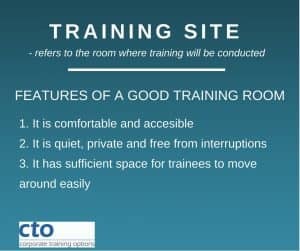
CTO Computer Training Room setupSet up a suitable area where you can conduct your computer training session.   This needs to be an environment where the trainees can concentrate on learning without interruption or distraction.

If your organisation does not have a training room, then a meeting room can be adapted for the purpose. Delegates should be able to comfortably see the trainer from their seats.

Each trainee should have the use of their own workstation or laptop for the duration of the course and enough space to use it.

A computer connected to a data projector for the trainer is extremely useful. A group of 1-3 trainees can easily gather around a shared computer screen.  However, groups of 4 or more will find a data projector necessary.  A whiteboard and pens are also helpful.


  1. Your Training Software

The correct version of the software should be loaded on each person’s computer and, ideally, everyone should be using the same version of the software. For example, running a course on Microsoft Excel where some delegates have Excel 2013 and others Excel 2016 could be challenging, since there are differences between the two versions.

However, rest assured that if you do have different versions of the software in your business, your CTO Trainer does know both versions, and will be able to manage the training for your team, pointing out the version differences during the course.


  1. Brief your training delegates

For your computer training to be effective, delegates must be available for the duration of the course.  They should ideally be off-limits to other members of staff. One way to achieve this is that they should be treated as absent from the office, until their course ends.

Equally, they should be motivated to do the training and agree that it will benefit them.  They need to believe that acquiring the new skills provided by the training will help them to work more effectively.

It’s not a good idea to add a few extra bodies to a training session just to make up the numbers. It is far better to include just those delegates for whom the training will be relevant and useful.  More focussed, smaller groups also allows your trainees to receive more personal attention from the trainer.


  1. Timing

Finally, to be effective, in-house computer training should be timely. Computer users should attend a course at a time when they are about to start using the software or using it in some new or more advanced manner. Immediately following their training, they should also have the opportunity to implement what they have learned.


They should have the software available on their own computers and there should be a requirement for them to use it as part of their daily routine.

If they don’t actually use the software for weeks or months after attending a course, the benefits of the training can be almost entirely lost.  This may lead to them needing to repeat the training session.


You can improve your computer skills with CTO’s extensive range of computer training courses, covering software that is used in business organisations around the world.

For more information on the Computer Training Courses available, please visit the CTO website – cto.com.au

With just a little advance planning, you can achieve a great return on your investment in training for your team.


About Corporate Training Options

Corporate Training Options (CTO) is an Australian Professional Development and IT Training Company, which provides customised, workplace training courses Australia-wide.

The courses provide a cost-effective way of ensuring you and your staff are making the most of your software applications.

CTO’s Computer Training courses are tailored to meet your requirements, and your training is provided on-site, on dates which suit you.

We look forward to working with you, to increase your productivity and  build your confidence in using your computer software.


For more information on the range of Computer Training Courses available, please visit the CTO website – cto.com.au


Rosy King

Corporate Training Options

Professional Training  –  Exceptional Results

training@cto.com.au

cto.noesis.chat/


Facebook Ads Training

2.2 Billion Reasons why you need Facebook Ads

Ramp up your Facebook Ads results with the CTO Facebook Ads Checklist

By: Corporate Training Options, Australia


Trust me – you need Facebook ads for your organisation.  Facebook is without a doubt one of the most effective forms of advertising and marketing. Worldwide, there are over 2.2 billion monthly active Facebook users, making it the most successful and popular form of social media advertising.

Facebook Ads Training
CTO’s Facebook Ads for Business Training improves the ROI on your Facebook campaigns

People spend, on average, 30% of their online time on social media, with the average time being spent on Facebook nearing an hour each day. With a market such as this at your disposal, can you really afford not to use it?

Content is fire. Social Media is gasoline.– Jay Baer, Founder of LinkedIn


Plan your Facebook Ads Campaign

CTO has now created a Facebook Ads Checklist to make sure you get your important Facebook marketing tasks done. Facebook can be distracting and you need to remember when you are on Facebook, that you are there to market your organisation.

Use our Facebook Ads Checklist as a guide to keep you focused

There are now a wide range of options available when it comes to Facebook advertising campaigns, so you need to decide on your goals before you start your campaigns. What are you looking to achieve? It may be clicks to your website, conversions, likes, content exposure or brand awareness. Keep the end result in mind when you plan your campaign.

Ensure you keep it Mobile Friendly

A huge 90% of people using Facebook use a hand-held device such as a mobile phone or tablet.  So be sure to keep your content mobile friendly.

So here it is.

The CTO Facebook Ads Campaign Checklist

Follow this checklist to bring a percentage of the huge amount of traffic that is on Facebook every day, to your site.


  • Brainstorm 3-5 things that are unique selling points for your company

What makes you stand out?  What makes you different?  Why should customers buy your product or service?

  • What is the goal of your campaign?

Is it clear and measurable?

  • Choose engaging images for your Facebook advertising
  • Write your titles with clear calls to action
  • Write the content of your advertising

Consider your message. Is there a clear message that you want to get through to your audience? Does this message stand out in your ad? Who is your message for?

  • Name your campaign something meaningful so that you will remember it in the future

You can save each of your advertising campaigns in Facebook, so it’s wise to use a campaign name which explains at a glance what is is.  Use the month and the year in the filename. For example: Book sales – July 2018.

  • Create unique advertising combinations

Combine your text in different ways and test the ads to find out which type of ads get the most likes, clicks and sales.

  • Define your target audience

Test your Facebook ads in different age groups, locations, and interest groups.

  • Choose an ad type that meets your goals

There are many different types of Facebook ads, so it’s important to use the right ad type to match your desired campaign goals.

  • Set an advertising budget for your compaign

Ensure that your advertising budget is made clear to your team members who are involved in the campaign. Take the cost of the testing phase into account.

Decide how much you will pay per click. The higher the price the more clicks you will receive. Choose from cost per click (CPC) and cost per thousand impressions (CPM).

  • Define your ad set names

Divide every ad set into different audiences messages and pricing structures. All names on your ad sets need to be different and they should define the content. Make sure that the content is written to best suit your target audiences.

  • Check the ad sizes and optimal settings before you upload your ad

Facebook changes ad settings periodically, so ensure you have checked them before you upload your ad.

  • Test the campaign
  • Use the best results from your tests for your campaigns
  • Set dates for your Facebook Ads campaign


To gain a slice of the market of more than 2.2 billion users who are on Facebook every month, ensure you cover all 15 points on the Facebook Ads checklist each time you plan a new campaign.

You can also improve your current Facebook marketing skills with CTO’s Facebook Ads for Business Training.

To book your training today:

  • Click here to see the topics covered in the hands-on training, and receive a quote
  • Click here to book your onsite, customised training – and have an ad campaign up by the end of the day!


About Corporate Training Options


Corporate Training Options is a Business Education Training Company, which provides customised Professional Development & Business Technology courses Australia-wide.

The courses provide a cost-effective way of ensuring you and your staff are presenting your best image to the world.

CTO’s Facebook Ads for Business training course is customised to meet your requirements, and your training is provided on-site, on dates which suit you.

We look forward to working with you, to build your confidence, improve your efficiency and maximise your potential.


For more information on the range of Corporate Training Courses available, please visit the CTO website – cto.com.au


Rosy King

Corporate Training Options

Professional Training  –  Exceptional Results


E: training@cto.com.au

W: cto.noesis.chat/