Ranked Among Australia’s Top 20 Corporate Training Providers (2026): View Courses

Author: Rosy King

CTO Technology Webinar - Microsoft Teams

CTO Technology Webinar – Microsoft Teams

CTO Technology Webinar - Microsoft Teams

CTO Technology Webinar – Microsoft Teams


In this CTO Technology Webinar, you will  learn how to Unleash the Power of your Technology, using Microsoft Teams.

Microsoft Teams is a transformative tool for productivity in your environment.

As a hub for teamwork, it brings together people, information and powerful tools, for online chat, meetings, file sharing and collaboration.  While supporting your work in natural ways, Microsoft Teams will increase your enjoyment of the modern workplace environment.

Teamwork, after all, is about people, not just technology.


In this CTO Technology Webinar, Microsoft Teams Expert, Mal Reid, will demonstrate how Teams can transform productivity and increase both client and team engagement.
  • See Teams in action with online chat, meetings & collaboration
  • Learn about file sharing across your organisation
  • Discover how teamwork can bring together people & information

Webinar Bonus
Learn how Teams will also increase your enjoyment of work.
Teamwork, after all, is about people, not just technology.


View our Webinar.

CTO Technology Webinar – Microsoft Teams

Held: Thursday 23 April, 2020

Duration: 15 minutes

Webinar Link:

Build a Winning Sales Teams

5 Benefits Corporates love about Microsoft Teams Adoption

Want to know more about the Benefits of  Microsoft Teams Adoption in your workplace?

Brought to you by: Rosy King @  Corporate Training Options


“Microsoft Teams has given every team member – even the quietest ones – a voice.”

Cherie Scholte


The Benefits of Microsoft Teams Adoption into your organisation include providing you with a powerful collaborative platform, which corporate businesses in Australia and across the world are embracing, for a number of reasons.

While you may think it is just another app, it isn’t.  It’s much more than that.  However many IT administrators, end-users and corporates are still trying to figure it all out.

So let’s have an overview.


About Microsoft Teams

Microsoft Teams helps boost team productivity, increase collaboration across departments and helps staff located both in-house or remotely, to complete tasks in a quick, efficient and professional manner.

It also supports file-sharing, real-time instant chat for effective communication, as well as live streamed events, with a single user interface that works across all devices.

Additionally, companies that connect third-party solutions such as their social media to Microsoft Teams dramatically in­­­crease their organisations’ efficiency, team involvement, culture and communication processes.


Microsoft Teams App for mobile

There is also a Microsoft Teams app compatible with iOS and Android operating systems, for use on smartphones and tablets.

This gives your team out in the field instant access to files, discussions and other tasks so communication and collaboration continue effortlessly.


So, what is a Microsoft Team?

At its core, you work in different “teams”.  Think of each team as a house. If you’re a member of that house you work together with the other members, and are included in everything that goes on within your house.


What’s a Microsoft Teams Channel?

Microsoft Teams has general “channels”, that can be likened to rooms in your house.

In these rooms, members of the team can have conversations, reply and communicate with each other.  This makes Microsoft Teams easy for your staff to show off their personality, even though team members can be separated by thousands of miles.

You can also have private channels in Microsoft Teams.  As the name implies these “channels” or rooms are only available to the select people you have chosen to have in that room.


Here are five benefits corporates love about Microsoft Teams adoption in the workplace.


Collective Collaboration with Increased Productivity Power 

When your organisation and your staff adopt  Microsoft Teams – you’re guaranteed to have coherent communication, collective collaboration and increased company productivity!

Let’s say you have a team who are currently working on a shared project, using email correspondence as the main form of communication.  In many cases, crucial project directives and information could be lost in email threads.  When dealing with large-scale teams, email threads are simply not an effective means of communication.

The beauty of Microsoft Teams lies within real-time messaging. Keep your whole team up-to-speed with direct messaging – eliminating time delays and solving problems faster.

New team members can see all the prior conversations and posts, too – so no-one is left out of the loop. This makes Microsoft Teams a much more collaborative and interactive solution for staff communication, as opposed to strictly emailing.

So when you decide to integrate this program into your organisation, training will be needed if you want to guarantee long-term program adoption.  Training will help your organisation, and your staff communication can thrive off the benefits.


Store & Record Conference Calls, Brainstorming Sessions, Audio and More

If you’ve ever had to sort through thousands of emails or notes looking for that one idea discussed, you’ll understand that it can be extremely time-consuming and frustrating.

When your organisation adopts Microsoft Teams into every-day work, you’ll soon be making up for  lost time.

Any crucial note, particular date or project idea discussions are all captured within Microsoft Teams.

With the powerful chat function and interface, you can store conference calls, ideas, and notes from brainstorming sessions. Plus, you can even find a specific conversation with a specific person on a specific day quickly and easily!


Flawless Integration with other Office 365 Applications

Another benefit for organisations adopting Microsoft Teams is being able to view and integrate other Office 365 applications. This means your team members can view and edit Excel spreadsheets, PowerPoint presentations, Word documents and other files within Office 365 collaboratively.

This flawless integration also eliminates the need to switch between programs. Team members and staff will not miss any important directives about specific projects and tasks. This allows changes, reviews and communication to happen effectively, both remotely and in-house.


Customised Third Party Integration

Microsoft Teams also allows you to integrate up to 150 third-party services, such as your business social media, into its interface.

This is extremely beneficial for many businesses – and sees many marketing departments collaborate much more effectively.

By integrating your Microsoft Teams with any number of third-party services and applications, your organisational teams will stay on top of tasks, too.


Control Mobile Work Devices with Microsoft Intune in Office 365

Another great benefit for corporates of adopting Microsoft Teams, is IT admins can have considerable control of your mobile devices using Microsoft Intune.

With Microsoft Intune your IT department can

  • Manage mobile devices and which people can access specific company data
  • Control how your team can access and share data
  • Ensure your mobile devices and applications comply with all your organisation’s IT security
  • And protect the shared and stored data on those mobile devices


All in all, there’s a plethora of fantastic benefits your organisation and your team members can experience.

However, customised training for effective adoption is imperative to take advantage of the long-term benefits of these programs.

When training is integrated as part of your Microsoft Teams rollout, you will experience the benefits within in your organisation, for your team, your customers and your suppliers.  To keep moving, growing, building and thriving – look into a Microsoft Teams Corporate Adoption Program for your organisation.


Just take a look at these statistics from Microsoft, on the impact on organisations after the Microsoft Teams 90-Day Corporate Adoption:

  • 3.2 hours of increased productivity per user per week
  • $1.4m in savings on travel costs and associated expenses
  • 88% of Teams users surveyed said real-time communication accelerates collaboration
  • This and more are all possibilities for your organisation, when you take the next step towards implementing Microsoft Teams


Want to learn more about the benefits of Microsoft Teams Adoption ?

When the best adoption practices are implemented, you will improve your operations, transform productivity, provide better customer experience and improve employee engagement.

Contact  Corporate Training Options for friendly, professional advice about our Microsoft Teams Corporate Adoption Program.

We will work with your systems integrators and business representatives to implement a 3-Phase program, resulting in highly engaged attendees, who adopt their new skills and techniques into their own business context.


Here’s what’s covered:

Phase 1 – Start

  • Customer On-boarding and Teamwork Assessment Survey
  • Teamwork Readiness Workshop for Leadership Team
  • Setup your first Teams and Channels
  • Develop your Roadmap, Action Plan & Deliverables

Phase 2 – Experiment

  • Integrate your Microsoft Applications
  • Develop your Champions Program
  • Governance QuickStart – to develop your framework of best practice
  • Onboard your HelpDesk Support Team

Phase 3 – Scale

  • Define Outcomes and Measure of Success
  • Drive Awareness of the Teams roll-out program
  • Implement Training for all end users
  • Schedule Service Health Reviews


What will you do to improve collaboration in your organisation today?


Corporate Training Options


Customer Service & Sales training with CTO Customer Service & Sales training with CTO

7 Powerhouse Customer Service Tips

7 Powerhouse  Customer Service Tips

Brought to you by: Rosy King @  Corporate Training Options


Customer Service training with CTO    


“The goal of a company is to have customer service that is not just the best, but legendary.”

Sam Walton      


Customer service is the face of your business, and you want to ensure that your team performs at their best possible levels, at all times.  There are several things you can do today for your customer service team, to ensure they deliver excellence.  These 7 powerhouse customer service tips will help your team provide quality customer service, and make lasting impressions on your customers.    


“Do what you do so well that they will want to see it again, and bring their friends.”

Walt Disney  


7 Powerhouse Customer Service Tips to Deliver Customer Service Excellence


Be Proactive

Don’t wait until there’s a fire in your business to wonder how you should put it out. Instead, be proactive. Have workable action plans in place to help your customer service team deal with situations as they arise.  Practice the plans, so your team can deliver solutions for your customers quickly and easily.  


Foster Open Communication

Your customer service team should know your business’s philosophies and standards. Every employee that has some type of interaction with a customer, should have an in-depth understanding of your customer service standards, so there’s no confusion.  If there are areas they don’t understand, ensure open discussions are encouraged, to inform and enable your team.  


Treat Your Customers with Respect

The saying goes: “The customer is always right.”  While this may not always be true, it’s critical that your team treats every customer with the utmost respect and courtesy.  This culture of respect should extend between employees as well.  


Train your Team to be Problem Solvers

Instead of choosing to let go of a problem customer, you can train your team to rise to the challenge and work with them to solve the problems your customer has.  Not only can this help build your customer relations, but it strengthens your employees’ problem solving skills.  


Listen to Customer Feedback

Feedback will help your organisation to grow, as it provides you with new ways to constantly improve your services.   Make sure your entire team listens to feedback you receive from your customers.  Then use this feedback to upgrade your processes.  


Under Promise and Over Deliver

You should go to great lengths to keep your customers happy, and this includes not promising things unless you are 100% certain that your organisation can deliver. Instead of setting yourself up to fail, under-promise what you can do and dazzle your customers when you over-deliver.

An example of this might be that you know your shipment of new products is arriving next Monday.  One of your best customers is waiting for this product to arrive.  Contact them, and let them know you can deliver the product by next Thursday.  You have now set an expectation in their mind.  So just imagine how delighted they will be when the product actually arrives at their office on Tuesday – two days before the promised date.  


Monitor Your Competition

You want to outshine your competition, and one way to do this is to observe what they’re doing well.  Then, take what you learn and incorporate it into your own customer service practices.  This is a great way to shine, and also to leave your competition in the dust.  


“It can take months to find a customer….  Seconds to lose one.”

Vince Lobmardi


Smile on the phone - customers can hear it in your voice    

Want to know more about improving the skills of your Customer Service Team?

To gain an all-star customer service team, you have to give them the tools they need to thrive.  CTO’s training course – Customer Service Excellence – provides critical success training to ensure your customer service team is delighting customers.  

Your team will learn about:

  • The value of caring about your customers
  • Trends in customer service
  • How you can make a difference by applying the human touch
  • Managing face to face contact and the benefits of active listening
  • The value of complaints and the service recovery process
  • Learn who the customer is and about customer relationship management
  • How to engage with difficult customers when they are angry or unreasonable
  • Ways to increase customer loyalty and those moments of truth
  • How to increase sales via customer service
  • Sales orientation and the nature of persuasion


After completing your Customer Service Excellence one-day course, your organisation and team will have achieved a number of learning outcomes.

These learning outcomes include:

  • Acquire tools to provide quality customer service and make lasting impressions on customers
  • Explore how customers define the success of your organisation, as well as a customer’s emotional behaviour, and how that sensitivity influences his or her decision making
  • Discover techniques to increase customer satisfaction through your behaviour
  • Examine the techniques for providing service through face-to-face contact, the factors that contribute to the success of that contact, and the benefits of actively listening to your customers
  • Identify the stages of customer management and recognise who your internal customers are – you will also explore value chain management and how to make positive long-term decisions that add value to your company
  • Identify the guidelines for dealing with unreasonable and irate customers
  • Take action to increase the loyalty of the customers you serve
  • How to increase sales via customer service


If you’re ready to upgrade your skills to provide Powerhouse Customer Service, or you wish to tackle some new challenges, contact Corporate Training Options today for friendly, professional advice. We’ll discuss your specific needs, and tailor a training course to suit your requirements.  

Rosy King

Corporate Training Options

Professional Training  –  Exceptional Results

training@cto.com.au

www.cto.com.au


Corporate Training Options  


Teamwork with Microsoft Teams

CTO Training Tip – Microsoft Teams

How to create a new Team in Microsoft Teams

Teamwork with Microsoft Teams

Would you like to create a new team in Microsoft Teams?

When you first begin working in Microsoft Teams you will usually be working with teams which have already been created by other people within your organisation.  However, there may be times when you want to create a new team yourself.

When you create your own team, you can add members to it, so you can collaborate with them.  You can then send them messages, share files, participate in video chats, work together on projects, and so on.


The steps to creating a Team are as follows.

  1. In the Microsoft Teams sidebar, click on Teams to display the Teams tools and options in the middle and right panes of the Teams window
  2. Next, at the bottom of the middle pane, click on Join or Create a Team
  3. Then, click on Create a Team in the right pane, which will open the next window


Image to Create a new Team in Microsoft Teams


  1. In the Create your Team window, you can choose to Build a Team from scratch, or Create your new Team from an existing Office 365 group or team


Create your Team in MS Teams5. Next, choose your Team’s Privacy Level.

  • Select Private if you only want the people who are part of your team to view the team’s content.
  • Select Public if anyone in your organisation can join your team.

Set up a Private Team in Microsoft Teams

  1. Give your Team a name and complete the team details, then click on Create


CTO Training in Microsoft Teams


7. Next, add your team members, or skip this step if you prefer.


Add Team members to Microsoft Teams


8. Your new Team will now be created. From here, you can continue to add more people to your team or create new channels if you prefer. You can also start a new conversation from this window.


Add Channels to Microsoft Teams


If you require Microsoft Teams training in your organisation, please don’t hesitate to contact us.

We can customise your Teams training to suit your requirements and present your training on dates which suit you.

Corporate Training Options


SharePoint Training with CTOI

Powerful Productivity with SharePoint

You can have powerful productivity with SharePoint tools at your fingertips.  Here’s how to use Microsoft SharePoint to your Best Advantage

Brought to you by: Corporate Training Options


SharePoint in Office 265


More than 200,000 organisations and 190 million people worldwide have SharePoint for intranets, team sites and content management. Why you may ask?

Microsoft Sharepoint is web-based intranet software that has purposely been designed to increase the efficiency of your organisation, as well as dramatically improve teams’ collaboration and innovation.

It helps to improve your company’s processes by reorganising the administration of – and access to – data. The software is unique because it gives users access to versioning and check-in and checkout functions – with everything in one place.

And, for added convenience, it can be configured to run Internet, Intranet and Extranet sites.

SharePoint Productivity

So, could your organisation’s internal communication be more efficient?

Do you want powerful productivity with SharePoint when working on projects?

Find out more about our Microsoft SharePoint Training Courses here.


Here are the areas where you can realise powerful productivity with SharePoint.


Integrated with Office 365

SharePoint integrates with Office 365, providing you with  effective document management capacity. It makes your work processes more efficient and saves you time. This impacts your business’s bottom line.

Version Tracking

One of Microsoft SharePoint’s key features is that it tracks versions of your documents. There is a lot of information available about each file – when team members look at it, they see its entire history. Version tracking makes the whole process of reading, writing and managing files and projects easier.

SharePoint enables Staff Collaboration and Communication

Are you finding it difficult and time consuming to collaborate with team members on projects?  SharePoint allows you to share and manage content, knowledge and information quickly. It’s much more effective than emailing where documents can become lost, or emails remain unread. Any messages between your staff are merely posted on SharePoint – everyone has instant access.

SharePoint is designed around getting your staff members to work from a central point in a team environment. This is great in all types of organisations, especially where there are multiple branches and team members working offsite.

While some of your people may only interact with other staff sporadically, and others continuously work together, SharePoint has one central meeting point where everyone can collaborate.


SharePoint Group

Great for Editors

Microsoft SharePoint is ideal for editors. You can see all versions of documents and reports run in relation to the documents. You can see a history of the document and edit it as needed – looking at multiple versions if appropriate.


Ease of Use

With proper training, even your non-technical people can administer, change and update SharePoint. It’s a simple and easy to use point and click system.

Designed for Efficiency

SharePoint has been designed with efficiency in mind. Using the program, your staff can set up websites to share information with other team members, manage documents from start to finish and share reports.  This allows your managers to make better decisions regarding your projects.  SharePoint allows you to transform your business processes, using  libraries and lists, and apps such as Microsoft Flow and PowerApps

Ideal for staff in all Departments

Microsoft Sharepoint is designed for to be used by your staff in every area of your organisation. It provides dynamic team sites for every project team, division or department.  You can share files, data, resources and news effortlessly and securely.  You can work with others both inside and outside your organisation, across Macs, PC’s or mobile devices.


In Summary

SharePoint is excellent if you are working on projects where information needs to be continuously shared.  Sites for your team are managed, reports created, and documents accessed from one central spot.  SharePoint increases the efficiency within your organisation, as well as dramatically improve teams’ collaboration and innovation.

So, are you and your team making the most of this powerful productivity tool?


Corporate Training Options


At Corporate Training Options our highly skilled trainers have extensive experience in using Microsoft Sharepoint, and providing training in the software.

Our Microsoft SharePoint – Introduction course will provide you with the skills to navigate SharePoint Online, create team sites, create and use basic libraries and lists, and much more.

Enrol today or contact us for more information!


Power BI onsite or elsewhere

The Benefits of Power BI

By: Corporate Training Options, Australia

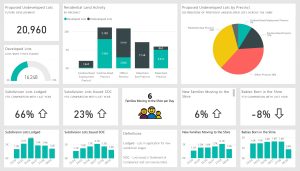
Power BI Dashboards


What are the benefits of Power BI for your business?

Business never sleeps. It never takes time off, nor slows down.

Therefore, part of your competitive advantage lies in getting the latest and most essential information instantly.  You can then analyse it and use it to make informed decisions quickly and flexibly.

For these reasons, you need the Power BI app from Microsoft as an essential part of your workplace toolkit.

Power BI does much more than provide up-to-date, raw and unrefined business information. Business leaders from CEOs of global corporations to owners of family-run small businesses will benefit from this app in a variety of ways.


What is Power BI?

Power BI from MicrosoftMicrosoft Power BI is a Business Intelligence product.  It’s a cloud based business analytics tool, which you can use to view an extensive range of data through interactive reports and dashboards.

With Power BI you can visualise, analyse and share data at a much faster and more efficient rate, allowing you to discover insights into your organisation and your industry, and to forecast trends.

Power BI provides near real time analytics at any point and you can distribute business intelligence (BI) across your organisation, working both in the office or on mobile devices.

With Power BI, you can collaborate with your team to gather useful business information and easily turn data centered reports into live dashboards with the help of cloud services

If your organisation is looking to gain a better insight into your business, competition, and customers, while keeping pace with constantly changing market conditions, Power BI is a great business intelligence solution.


How does it work?

Power BI is used to find insights within your organisation’s data.  It lets you:

  • Import data into your interface from various sources
  • Integrate and connect to various platforms
  • Transform and clean your data to provide data visualisation, making your information more understandable
  • Use your data models to analyse your data, to find patterns and help you make business decisions
  • Ask questions of your data, to get instant answers in layman’s terms


The Benefits of Microsoft Power BI

Power BI onsite or elsewherePower BI can provide executive dashboards for your managers, giving them more insight into how departments are doing.  You can use it to create reports and forecasts to aid sales and marketing reps, or provide data for team leaders on how individual employees are progressing toward their goals.

There is a portal for administrators, to help configure the implementation of Power BI, as well as monitor usage and licenses.

And one of best things about Power BI is the ease with which any individual can do these things.


Making critical and informed decisions about your business requires more than just information.  You need business intelligence. 

Power BI data analysisThe Power BI app from Microsoft  provides business information and insights on what you need, when you need it.  It connects you with data organised by category, presented with appealing and interactive visual aids.

Your Power BI app keeps you connected to members of your team and others. It can share published reports, enhance collaboration, and help you share insights, while promoting better communication.

With your mobile phone, tablet or laptop, you have access toPower BI’s business intelligence and communications tools, wherever you are.


How can you Learn to use this Essential Business Tool

While the Microsoft Power BI app has earned praise for its ease of use, taking professional courses will allow your team to get the most out of the app – and maximise the benefit for your business.


Want to Learn More about the Microsoft Power BI App?

Taking a course in Power BI is the best way to learn its qualities quickly.

Corporate Training Options’ Microsoft Power Bi course is perfect.

You and your team can learn from experts and quickly discover the value of this vital product – the best intelligence possible to help you make informed decisions for your business.

Our Microsoft Power Bi courses provide important usage information, useful tools and clever tricks, as well as answers and ideas on your real-life questions from those who know best.


Corporate Training Options


Why Choose Corporate Training Options?

Corporate Training Options (CTO) is a Business Training Company, which provides training in essential business skills, via onsite courses which are tailored to meet your requirements.

The courses provide a cost-effective way of ensuring you and your team are presenting your best image to the world.

We will address your pain points and facilitate customised, onsite training that provides you with a solution to your immediate problem, plus teaches your team valuable new skills.


For more information on the range of Business Training Courses available, please visit the CTO website – cto.com.au 

We look forward to working with you, to build your confidence, improve your efficiency and maximise your potential.


Rosy King

Corporate Training Options

Professional Training  –  Exceptional Results

training@cto.com.au

cto.noesis.chat/


CTO Training for Microsoft Teams

6 Awesome Benefits of using Microsoft Teams

By: Corporate Training Options, Australia

Teamwork with Microsoft Teams


The benefits of using Microsoft Teams are many, including allowing you to harness the changes in the business world in recent times.  We now have:

  •  greater mobility
  •  widespread internet availability
  •  rising popularity of distributed teams
  •  more flexible working options

It is now an absolute minimum requirement for organisations to have online communications and collaboration hubs.  So wherever you are, you can keep doing business, working with a laptop or smartphone.

Microsoft Teams improves collaboration

We’ve adopted Microsoft Teams in our organisation this year, and with staff located across Australia, it has become an essential tool for us to run the business. So, I’d like to share with you some of the awesome benefits of using Microsoft Teams software.


Teams is included in Office 365

Firstly, did you know that Teams is included with your Microsoft Office 365 subscription?  Many organisations are paying for applications like WebEx, Skype for Business and Slack.  As a turnkey solution, Teams can simply be ‘switched on’ in your Office 365 account, so you can start enjoying improved collaboration and productivity without the added cost.

When used to its full capabilities, you could say that Teams is like WhatsApp, and FaceTime on steroids.  In my opinion it is game-changing for your staff, and the way you interact with your customers. Have I got your interest now?  Let’s take a look.


Microsoft Teams can enhance productivity and improve communications

Have you ever worked on Trello for project management, used Gmail for email, Zoom for video meetings or Slack for group messaging and chats?  If so, you would already be familiar with the need to switch screens and log in separately to access these different platforms.

One of the benefits of using Microsoft Teams is that everything is conveniently available in a single app and interface – from online meeting records, conversations, chats, shared files, tasks, and so on.  Popular Microsoft applications like Word and Excel, as well as a wide range of third-party software, can be seamlessly integrated into the Teams workspace so you can get your work done without the need to switch apps or leave Teams.

And the good news is – IT JUST WORKS!


Teams can help people focus on their tasks and be accountable

Microsoft Teams features secure channels for one-to-one or one-to-many messaging and chats.  The channels contain conversations, document repository and even meetings relevant to each channel.  This way, you can focus on the task at hand and engage with the people in the channels where you actually work. This means up to 30% less emails – and that translates into less NOISE!


Teams improves transparency and makes it fun

Make work fun with Microsoft TeamsTeams makes it easy to keep everyone involved in a particular project in the loop, through the channels feature, which acts a “sub-team”. If you need to communicate anything to some people in the channels you work in, all you need to do is @-mention them with your message. Everyone in the channel will see it, and the people mentioned can respond.

What’s more, communication enhancement elements like GIFs, likes, emoticons, and live link previews are automatically enabled, thereby promising a richer, more expressive communication platform. And if you happen to have a multilingual workforce, automatic translations of conversations are easily switched on.


The Teams hub facilitates a smooth transition to the Cloud

Teams is a fully cloud-based app, so your organisation’s transition to a cloud-based digital workplace will be seamless. With Teams, there’s no need to carry around files and documents or storage devices.  Anywhere you are, as long as there’s internet connectivity, you can conveniently access your workspace and stay on top of everything.


Microsoft Teams can make the adjustment phase easier for new staff

CTO Training for Microsoft TeamsThe benefits of using Microsoft Teams when on-boarding new staff is that the orientation process can be shortened.  There’s no need for lengthy explanations and introductions.

All you need to do is to include new team members in the channels they’ll be working in, and give them access to the files and documents they need, so they can start being productive.


Microsoft Teams – Document Version Control

The Microsoft Teams document collaboration tools mean you can take away version control and say goodbye to emailing back and forth various versions.  How good is that!


Of course, to fully harness all the advantages that Teams offers, you must know how to use it – well!  We have seen some outstanding results with our customers that are lighting up Teams.

We have two training options for you, which are the Microsoft Teams Introduction Course and the Teams 90-Day Adoption Program .  Both offer different levels of skills outcomes and can be booked directly on our website. Alternatively, please call CTO to discuss a more tailored solution for your organisation.

Please feel free to contact us to discuss your requirements for Teams training.


Learn more about the courses

The topics covered in our Microsoft Teams 1-day Introduction Course include:

  • Introduction and overview of Microsoft Teams
  • Creating and managing Teams
  • Team Conversations and video conferencing
  • Working with Teams
  • Managing Teams
  • Team Meetings
  • Microsoft Teams Mobile App


If you would like to take advantage of our Microsoft Teams Corporate Adoption Program, we will assist you to implement a 3-Phase Rollout, as follows:

Phase 1 – Start

  • Customer On-boarding and Teamwork Assessment Survey
  • Teamwork Readiness Workshop for Leadership Team
  • Setup your first Teams and Channels
  • Develop your Roadmap, Action Plan & Deliverables

Phase 2 – Experiment

  • Integrate your Microsoft Applications
  • Develop your Champions Program
  • Governance QuickStart – to develop your framework of best practice
  • Onboard your HelpDesk Support Team

Phase 3 – Scale

  • Define Outcomes and Measure of Success
  • Drive Awareness of the Teams roll-out program
  • Implement Training for all end users
  • Schedule Service Health Reviews


Corporate Training Options


Why Choose Corporate Training Options?

We will address your pain points and facilitate customised, onsite training that provides you with a solution to your immediate problem, plus teaches your team valuable new skills.


About Corporate Training Options

Corporate Training Options (CTO) is a Business Training Company, which provides training in essential business skills, via onsite, customised courses.  Your courses are delivered by more than 300 expert facilitators, who are located around Australia and in a number of international locations.  CTO Training provides a cost-effective way of ensuring you and your team are presenting your best image to the world.

CTO onsite courses are tailored to meet your requirements and can assist you to develop your skills in a range of topics, including:

  • Customer Service
  • Leadership & Management
  • Strategic Business Planning
  • Project Management
  • Marketing & Sales
  • Business Administration
  • Finance & Accounting
  • People & Culture
  • Computer Software Training
  • Personal Development


For more information on the full range of Business Training Courses available, please visit the CTO website – cto.com.au 

We look forward to working with you, to build your confidence, improve your efficiency and maximise your potential.


Rosy King

Corporate Training Options

Professional Training  –  Exceptional Results

training@cto.com.au

cto.noesis.chat/


Office 365 helps run your organisation

Transform your Business with Microsoft Office 365

By: Corporate Training Options, Australia


Microsoft Office 365 cloud software provides productivity and communication applications essential to any team and modern organization. These applications are the benchmark of software essentials, providing you with the tools you need for effective collaboration and communication.


The Benefits of working with Office 365

With 83% of organisations worldwide using Office applications, Microsoft Office 365 is an essential tool for workplaces and teams.  It helps you in a variety of ways, including. 

  • Increase productivity, by being able to manage daily tasks faster and easier
  • Improve communication, when you connect with team members and clients through teamwork apps
  • Streamline your business functions irrespective of the size and number of employee’s your organisation has
  • Access and use applications from any device – PC, tablet, mobile phone
  • Easy to set up, with access to support as required
  • Helps protect your intellectual property, data and business operations, with Microsoft security
  • And much more


Increase Productivity with Office 365

Office 365 improves Productivity

The ultimate question is, can you do your job more easily using Office 365.  The answer is yes, because Microsoft is invested in making your experience when using Office 365 easy and simple.  If you haven’t moved to Office 365 yet, you should certainly consider the upgrade.


CTO runs Office 365 Introduction courses at your workplace, on dates that suit you.  You can see the course outline here – Introduction to Microsoft 365 Office


What’s now available in Office 365?

Microsoft Office comes in a variety of flavours. The Microsoft Office 365 suite contains all the applications we are familiar with, plus new services that make teamwork more streamlined and easier to track and manage.

There’s all our favourites – Microsoft Word, Excel, Outlook and PowerPoint.  Plus Microsoft Office 365 includes: –


Manage your warehouse with Office 365

OneNote

A digital notebook that can be shared across different devices and users.  You can get organised and sort your content across notebooks, sections and pages.  You can also revise your notes with type, highlighting or ink annotations.  Mix your media by recording audio notes, inserting online videos and adding files.

OneDrive

OneDrive allows you to store your files securely, and you can then access them from any device on the Internet.  Also, OneDrive provides you with 1TB of storage in the cloud.

This was a lifesaver for me recently, after my laptop failed and I had to get a replacement.  With all my essential files stored on OneDrive, I was able to:

  • set up my new computer
  • log into my Microsoft account and delete Office 365 from my old laptop
  • download Office 365 to my new laptop
  • download OneDrive to my desktop, and bingo – all my files appeared
SharePoint

SharePoint encourages teamwork with dynamic sites where you can share files, data, news and resources.   It’s used to host intranet websites for organisations. Permissions for each page can be changed, allowing private pages for separate divisions of your business.

Exchange

Exchange handles your email management with business class email and calendaring.  It allows you to automatically capture events from your emails such as flights and hotel bookings, and adapts to your work style over time.

 Manage your calendars in OutlookMicrosoft Teams

A workspace that gives you the ability to chat, share files, assign tasks, see calendars and run online meetings and video calls.  Microsoft Teams is the way of the future for teamwork. If you already have Office 365, it’s included.  So download it today and take a look.


Office 365 Business Premium

You also have the option of choosing Microsoft Office 365 Business Premium, which offers even more applications and services.  These include apps such as:

Outlook Customer Manager

Outlook Customer Manager is part of Office 365 Business Premium.  You can use this tool to track customer contacts and manage relationships in Outlook.  With Customer Manager you can view customer details, the history of their transactions with you, and check on current and pending tasks

Microsoft Planner

Microsoft Planner allows you to streamline your teamwork.  Easily create new project plans, organise and assign tasks and share files when you need to.  Once tasks are assigned to you, you will receive an email notification, and daily notifications of the tasks that still need to be completed.  Microsoft Planner allows you to easily keep your team updated on your progress.

Skype for Business

A video-conferencing application that allows you to conduct meetings on the go and from any location.  Please note that this app will be phased out by the end of July 2021, and the technology will be integrated into Microsoft Teams.

Microsoft Flow

This tool allows you to automate workflows and tasks across several different applications.  Flow modernises business processes through digital automation and allows all users across an organisation to easily create digital business process flows.


What’s the difference between Office 2019 and Office 365 for Business?  And which one is best for you?

Microsoft Office 365 for Business is available in a number of different versions.  These versions are available for PC, Mac and mobile devices, and all include the standard Office apps: Outlook, Word, Excel, PowerPoint, Access (PC only)

Office 2019 stores the applications on the desktop and they are only accessible on the device they are installed on. You do not have access to files on the go.  Plus, with Microsoft Office 2019 on the desktop, you will need to buy a new version of the software when you are next ready to upgrade.

Office 365 provides extra applications (Outlook, OneNote, Exchange and OneDrive) as well as cloud storage and access. This means the applications, and your files, can be accessed on any internet-connected device.

Because of Office 365’s cloud structure, applications are also regularly updated, at no extra cost. Version updates of the application are simply downloaded to your computer.

Office 365 is offered as a subscription service, with fees charged per user, depending on the size of your organisation.


 Office 365 Business includes the Office apps, plus the Services: OneDrive.

This version is best for organisations which want Office apps plus cloud storage and sharing across devices.  Business email is not included.

Office 365 Business Premium includes the Office apps, plus the Services: One Drive, Exchange, SharePoint, Teams.

Best for organisations that need Office apps, business email and other business services across devices.

Office 365 Business Essentials includes the Office apps as web and mobile versions only, plus the Services: One Drive, Exchange, SharePoint, Teams.

Best for mobile businesses, as desktop versions of the Office apps are not included.


Transform your Business Processes 

The tools in Microsoft Office 365 allow you to increase productivity by transforming your systems and processes.  It allows you to easily complete tasks that are simple and straight forward, right through to complex organisational workflows.

With access to apps like SharePoint, with its lists and libraries; Microsoft Flow to automate workflow; and Microsoft Teams to chat, share files, assign tasks, see calendars and run online meetings and video calls, Office 365 is the way of the future for teamwork.


Learn more about the course

The Introduction to Microsoft Office 365  course from CTO will teach you the functions of Microsoft 365, plus some great tips and shortcuts.  The topics covered include:

  • Introduction to Office 365
  • Getting Started in Office 365
  • Starting with Mail
  • Navigating the Calendar
  • Working with People and Contacts
  • Understanding Groups and Engaging Teams in Communication
  • Understanding the Newsfeed and Managing Posts
  • OneDrive for Business – how to Store and Access your Files
  • Understanding Office Online & the Backstage View
  • Working with Mail
  • Your Mail Options Screen
  • Setting up Automatic Mail Replies, Rules & Signatures


To see all the skills you and your team members will acquire, here is the full course outline for the Corporate Training Options course – Introduction to Microsoft 365 Office


Corporate Training Options


About Corporate Training Options

Corporate Training Options (CTO) is a Business Training Company, which provides training in essential business skills, via onsite and online professional development courses.

The courses provide a cost-effective way of ensuring you and your team are presenting your best image to the world.

CTO onsite courses are customised to meet your requirements and will assist you to develop strong skills in:

  • Customer Service
  • Leadership & Management
  • Strategic Business Planning
  • Project Management
  • Marketing & Sales
  • Business Administration
  • Finance & Accounting
  • People & Culture
  • Computer Software Training
  • Personal Development


For more information on the range of Business Training Courses available, please visit the CTO website – cto.com.au


We look forward to working with you, to build your confidence, improve your efficiency and maximise your potential.


Rosy King

Corporate Training Options

Professional Training  –  Exceptional Results

training@cto.com.au

cto.noesis.chat/


Communication is Key

Manage your Business by the Numbers to Accelerate Growth

By: Corporate Training Options, Australia

Manage your Business by the Numbers


Manage your Business by the Numbers and you’ll know how your Business is Performing

In this article you’re going to learn a little about how to Manage Your Business by the Numbers.

The fact is, it’s essential for business owners and managers to understand their business financial statements.

If you only look at your business financials at the end of each month, or at the end of each quarter when your BAS is due, then you are missing out on huge opportunities in your business. Why?  Because your financial reports tell the story of how your business is performing, and show you ways to make improvements, and increase profits.

To learn more about the Managing by the Numbers Finance Training course available from CTO, click here.

How is your business performing?

I know many business owners who have started out and are going great guns, but are not tracking their performance.

Let me tell you, if you don’t know the basics; for instance, what your Breakeven Point is; you should.

If you don’t understand the numbers in your Profit and Loss or Cash Flow reports; you should.

If your Balance Sheet makes no sense, then you need to learn how to read it.

Why?

A Cautionary Tale

Let me tell you a story about a consultant who was working in our business.  Each week when he came into the office, the first thing he did was review the Profit and Loss Report, the Cash Flow Analysis and the Balance Sheet. After that, our business meeting could begin, and he could offer logical business growth advice based on facts, because we all knew the business numbers!

One day, he told me how he had been to see a new client, who had not reviewed their Balance Sheet Report for more than six months.  The business owner had simply been relying on the company accountant to pay all outstanding bills, and to advise him of their ongoing profitability, and their expected future costs.

The first thing our consultant noticed when he reviewed the Balance Sheet was that the company had outstanding GST liabilities.  Upon further inspection, he realized that no GST payments had been made for over six months.  The company owed the ATO over $120,000!

That was a huge shock to the business owner.  He then had to scramble to make a payment arrangement with the ATO to pay off the outstanding debt, while also dealing with current and ongoing GST liabilities, while keeping the business afloat. This business owner did not know his business numbers!


The Horror Stories

Then there are the horror stories you read in the news, about company accountants and bookkeepers who have embezzled from the organisations they worked for, without the owners ever missing the funds.

Now if the business owners and financial managers had been keeping an eye on their financial reports, and if they had understood their business numbers, they may have picked up earlier that something was amiss.

The only one of these stories that ever had a positive ending was when it was discovered that the bookkeeper had been taking the company funds, and investing in real estate.  By the time she was discovered, she had purchased more than 21 houses (we are talking about a big company here, with millions in cash flow each quarter).  The upside was, the company was able to sell the properties at a profit, as the Australian housing market had been gaining strength for some years.

However, most of these stories end very badly, and often, embezzlement can send a company bankrupt.

Why you should Learn how to Manage by the Numbers

So, learning how to manage your business by the numbers, can offer you huge advantages.  Once you know how to read and understand your financial reports, you can:

  • Learn how to find the Right Numbers
  • Review your Financial Statements
  • Make more Money
  • Identify Costs and Their Behaviours
  • Control Costs
  • Learn your Breakeven Point
  • Understand Influences on Pricing
  • Make the Numbers Work for You


What is a Breakeven Point?

By the way, if you don’t know what a Breakeven Point is, here’s a really simple overview.  A Breakeven Point is the point at which your sales exactly cover your expenses.  It’s arrived at by an analysis which allows you to know precisely when your business will begin to cover all expenses and start generating a profit.  Now that is a really BIG date on your business calendar.

Imagine the day you reach that magic number, and you know that from here on in, as sales increase, you’ll finally be making a profit.  Whether this happens on day 60 or day 600 from when the business was started, it’s a great day in any organisation.


Why is a Knowing your Breakeven Point important?

So why is this simple number so important?  Well, imagine the information you’ll have at your fingertips when you complete your Breakeven Analysis, and what you can do with it.

You can start to better manage your fixed costs, like rent and insurance, and reduce them if you have to.  If you’re not making money yet, why not move to slightly cheaper premises for a while, or even work from home.

You can also work on your variable costs.  Things like marketing, labour, commissions, credit card fees, even freight costs if you ship stock.  Examining each area of your variable costs allows you to reduce these costs where possible, which immediately increases your chances of hitting breakeven sooner.

Lastly, you can look at pricing.  If your products or services are selling well, you may consider raising your prices. This can instantly lead to increased profits, and tip you over the edge of your Breakeven Point.  From here on in, it’s smooth sailing all the way.


What about your Cash Flow Report?

Cash flow is vitally important to your business.  Even if you are very profitable, you can still go out of business if you run out of cash.  Your Cash Flow statement tells you what revenue is coming in, and what it will be spent on.  Even if profits are high, you may not be able to pay the wages next week, if your cash flow is low.  Everything you do in business uses up cash, including buying equipment, adding inventory, marketing for new customers, and paying wages. Understanding your cash flow can help you focus on ensuring you always have enough.


The reality is …

Having a solid understanding of how your businesses finances work is vital for any business owner or manager wanting to boost their metrics, reduce costs, and accelerate their business growth.

The trouble is, many business owners and managers feel that these essential financial metrics are the Company Accountant’s responsibility.


Consider this for a moment

What if you and your managers start to be proactive, so you can identify, learn and apply various accounting strategies and essentials in your organisation.   These strategies relate to financial data such as:

  • Learning about operating leverage and its impact on profitability
  • Understanding key financial terminology
  • Gaining an understanding of how various business transactions are reflected in your financial statements
  • Demonstrating awareness of relevant taxes (including goods and services tax)
  • And being able to explore the different types of costs and their effect on your profitability

Whether you’re a business owner, a professional looking to become self-employed or a manager wanting to better understand your company’s operations strategy, understanding how you can manage your business by the numbers will equip you with the fundamental knowledge you need, to understand and grow your business.


In Summary

Understanding how to manage your business by the Numbers is essential.

Imagine being able to review your financial statements accurately and confidently. Your business, operations and profits can accelerate fast, and your costs can be reduced!

If you think you need an accounting background to learn these skills, you don’t.  The fact is anyone can learn and apply these essential business financial skills.

Additionally, they are crucial if you are to thrive and accelerate your business growth in today’s competitive marketplaces.


Learn more about the course

If you want your organisation to thrive, getting the right training is fundamental.

Corporate Training Options has a wealth of knowledge that we’ve shared over the years when training business owners, managers and company teams with great success.  We’ll help you to understand your business numbers, to reduce costs & accelerate your business growth, with skills that are easily learned and quickly adopted.

The Benefits and Learning Outcomes you will achieve from our course – Accounting Essentials: Managing by the Numbers include you being able to:

  • Learn how various business transactions are reflected in the financial statements
  • Identify the five cost categories and their components
  • Explore the types of costs and their effect on profitability
  • Understand the concept and calculation of break-even analysis
  • Learn about operating leverage and its impact on profitability
  • Discover the various influences on determining the appropriate price for a product or service
  • Understand the problem-solving process of identifying costs relevant to decision-making


For more information or to book your training, view the details of the course here.


Corporate Training Options


About Corporate Training Options

Corporate Training Options (CTO) is a Business Training Company, which provides you with training in essential business skills, via onsite and online professional development courses.

The courses provide a cost-effective way of ensuring you and your team are presenting your best image to the world.

CTO onsite courses are customised to meet your requirements and will assist you to develop strong skills in:

  • Customer Service
  • Leadership & Management
  • Strategic Business Planning
  • Project Management
  • Marketing & Sales
  • Business Administration
  • Finance & Accounting
  • People & Culture
  • Computer Software Training
  • Personal Development


For more information on the range of Business Training Courses available, please visit the CTO website – cto.com.au


We look forward to working with you, to build your confidence, improve your efficiency and maximise your potential.


Rosy King

Corporate Training Options

Professional Training  –  Exceptional Results

training@cto.com.au

cto.noesis.chat/



Be flexible and dynamic when working with business budgets.

Why you need Business Budgets and Plans

By: Corporate Training Options, Australia


Learn to prepare and manage Business Budgets with CTO Training

Business Budgets that are regularly monitored and updated are key to business success.  Checking and adjusting your budgets allows you to allocate resources when they are needed, so your business continues to grow and remains profitable.

Successful business budgets work best when you tie them in to your Strategic Plan.  And your Strategic Plan needs to be developed in conjunction with your Operating Plan, which includes your business budgets and forecasts.  When you build all these documents together – your strategic plan, operating plan and business budgets – this can help you achieve and sustain business growth and profitability.


Why Bother Planning?

Some of the key benefits of business planning are that it allows you to focus on the direction of your business, and provides you with targets to monitor your business success. As your business grows and changes, you need to know how you’ll move forward.  This allows you to be more flexible and dynamic when planning and budgeting for the future.

Build Strategic Plans with CTO Training

A Strategic Plan determines the vision for your organisation’s future, and identifies your long term goals and objectives.  It establishes agreement around intended outcomes and results. Your Strategic Plan looks further ahead than your Operating Plan, and helps you make sense of a constantly changing business environment. It also helps you forecast where you’re going, so you can budget accordingly.

Your Operating Plan sets out the strategy and action plan for your business over the coming twelve months. It can outline the changes you plan to make in your business, set your goals, objectives and key performance indicators, and includes your financial performance and forecasts.  

To learn more about the training available on this topic from CTO, visit the course page – Strategic Planning, Budgeting & Forecasting.


Plan your work for today and every day.  Then work your plan.

Margaret Thatcher


How to Build a Strategic Plan 

A Strategic Plan helps you forecast the future of your business in a world where change is ongoing. The key to dealing with constant change is careful strategy development, around your business budgets and forecasts.

When working on business budgets, you also need to work with your organisation’s leaders on the business Strategic Plan. Your Strategic Plan can be developed via the following steps:

  • Determine your organisation’s Vision for the future
  • Write or update your Vision and Mission Statements
  • Analyse the external environment
  • Review your internal capabilities
  • Set annual goals for your organisation and devise actions to achieve these goals
  • Allocate resources and set budgets to execute the actions
  • Put it all together

Business Budgets in your Annual Operating Plan

Operating Plans involve utilising the resources at hand to the best of your ability. When putting together a Business Operating Plan, you need to begin by considering the goals you want to achieve for your organisation this year.  Next, break that down into quarters so you can identify which key priorities will be your focus.

Review your Sales History, and forecast your sales growth for the next twelve months.  Next, budget for your projected Sales, and your Costs of Sales. Also then include your labour expenses, depreciation of plant and equipment and other business expenses.

As your year progresses and you move from one quarter to the next, monitor your budget for any changes that will require you to alter your operating plan. Sometimes priorities will change, which may necessitate a different course of action. This will help you focus on critical tasks rather than those that aren’t as important.

Preliminary Steps to Create your Annual Operating Plan:

  • Draft your Annual Goals
  • Review your Organisational Plan
  • Examine you Sales History and Create your Sales Projections
  • Create a Fiscal Calendar
  • Budget for Sales and Costs of Sales
  • Include Labour expenses in your budget
  • Budget Depreciation and other Expenses
  • Work on your Balance Sheets and Cash Flow Plans

When preparing business budgets for a new financial year, often the approach is to simply add five to ten percent to the previous year’s budget. This is a starting point; however, you should also determine what resources will be necessary to achieve each projected budgeting goal. These resources can include things such as personnel and various types of available funding.

Reviewing and Executing Business Budgets

The purpose of a business budget is mainly to plan, track and control spending.  As the year progresses, it’s important to ensure your budget is on track by conducting regular budget reviews.  Monitoring your expenditure is essential, not only to track expenditure against your targets, but also to identify any changes in circumstances which may need corrective action.

Be flexible and dynamic when working with business budgets.

It’s also important to ensure that business income is achieving projected targets, to ensure your budget remains balanced, and in sync with your forecast business growth.

When planning and executing business budgets, you should also account for inevitable changes in resources which were part of your initial forecasts. As the business environment continues to shift, you’ll need to modify your overall plan, including evaluating its effectiveness. As your resources are altered, update the forecast, and advise those around you, so they will be aware of what is to come.


Adjusting your Plans and Business Budgets

In the business world, small differences between actual and budget figures are normal and to be expected. It’s therefore important that you learn how to create and manage an adjusted plan.  You may also need to create new forecasts if you have significant variance in your budgets.  This is where adjusting your plans and business forecasts allows you to use your plans to improve business control.

Business budgeting and planning is key to business success.  Creating, monitoring and adjusting a budget allows you to allocate resources when they are needed, so your business continues to grow and remains profitable and successful.

By investing the time to create and manage budgets, and by basing your budget on your business operating and strategic plans, you will be creating a financial action plan that can make all the difference to the growth of your organisation.  It will enable you to concentrate resources on improving profits, reducing costs and increasing returns on investment.  The most important things are that your business plans and your business budgets are dynamic, and are communicated to everyone involved in your business prosperity.

In Summary

Strategic plans and Operating plans are both part of the business budgeting process. 

Strategic planning allows you to develop a vision for your company – where you want it to go and how you plan to get there.  Operating Plans provide your business roadmap for the next fiscal year.

Business budgets are an essential part of executing these plans and ensuring the steps to get there are financially realistic and cost effective.  

It’s important that the two processes are kept in alignment and developed at the same time.  Your strategic planning and business budgets should influence each other, keeping you informed about your business progress, and keeping you on track to succeed.


Learn more about the course

Corporate Training Options presents a Strategic Planning, Budgeting & Forecasting course, which will provide you with the skills to create a Strategic Plan and an Operating Plan for your business, and Business Budgets for sales, labour and expenses.  

You will also learn to interpret a Balance Sheet, review Financial Plans and prepare Business Forecasts. 

The Benefits and Learning Outcomes you will achieve from the Strategic Planning, Budgeting& Forecasting course, include you being able to: 

  • Understand the principles of strategic planning
  • Build a strategic plan starting with a mission statement
  • Create an annual operating plan
  • Budget sales and cost of sales
  • Include labour expense
  • Budget depreciation and other expenses
  • Create and interpret a balance sheet
  • Review financial and presentation aspects of budget plans
  • Create an adjusted plan and forecasts

For more information or to book your training, you can contact Corporate Training Options by emailing us at training@cto.com.au.


Corporate Training Options

About Corporate Training Options

Corporate Training Options (CTO) is a Business Training Company, which provides you with training in essential business skills, via onsite and online professional development courses.

The courses provide a cost-effective way of ensuring you and your team are presenting your best image to the world. 

CTO onsite courses are customised to meet your requirements and will assist you to develop strong skills in:

  • Customer Service 
  • Leadership & Management
  • Strategic Business Planning
  • Project Management
  • Marketing & Sales
  • Business Administration
  • Finance & Accounting
  • People & Culture 
  • Computer Software Training
  • Personal Development

For more information on the range of Business Training Courses available, please visit the CTO website – cto.com.au

We look forward to working with you, to build your confidence, improve your efficiency and maximise your potential.


Rosy King

Corporate Training Options

Professional Training  –  Exceptional Results