
Want to know more about the Benefits of Microsoft Teams Adoption in your workplace?
Brought to you by: Rosy King @ Corporate Training Options
“Microsoft Teams has given every team member – even the quietest ones – a voice.”
Cherie Scholte
The Benefits of Microsoft Teams Adoption into your organisation include providing you with a powerful collaborative platform, which corporate businesses in Australia and across the world are embracing, for a number of reasons.
While you may think it is just another app, it isn’t. It’s much more than that. However many IT administrators, end-users and corporates are still trying to figure it all out.
So let’s have an overview.
About Microsoft Teams
Microsoft Teams helps boost team productivity, increase collaboration across departments and helps staff located both in-house or remotely, to complete tasks in a quick, efficient and professional manner.
It also supports file-sharing, real-time instant chat for effective communication, as well as live streamed events, with a single user interface that works across all devices.
Additionally, companies that connect third-party solutions such as their social media to Microsoft Teams dramatically increase their organisations’ efficiency, team involvement, culture and communication processes.
Microsoft Teams App for mobile
There is also a Microsoft Teams app compatible with iOS and Android operating systems, for use on smartphones and tablets.
This gives your team out in the field instant access to files, discussions and other tasks so communication and collaboration continue effortlessly.
So, what is a Microsoft Team?
At its core, you work in different “teams”. Think of each team as a house. If you’re a member of that house you work together with the other members, and are included in everything that goes on within your house.
What’s a Microsoft Teams Channel?
Microsoft Teams has general “channels”, that can be likened to rooms in your house.
In these rooms, members of the team can have conversations, reply and communicate with each other. This makes Microsoft Teams easy for your staff to show off their personality, even though team members can be separated by thousands of miles.
You can also have private channels in Microsoft Teams. As the name implies these “channels” or rooms are only available to the select people you have chosen to have in that room.
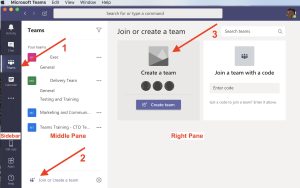
Here are five benefits corporates love about Microsoft Teams adoption in the workplace.
Collective Collaboration with Increased Productivity Power
When your organisation and your staff adopt Microsoft Teams – you’re guaranteed to have coherent communication, collective collaboration and increased company productivity!
Let’s say you have a team who are currently working on a shared project, using email correspondence as the main form of communication. In many cases, crucial project directives and information could be lost in email threads. When dealing with large-scale teams, email threads are simply not an effective means of communication.

The beauty of Microsoft Teams lies within real-time messaging. Keep your whole team up-to-speed with direct messaging – eliminating time delays and solving problems faster.
New team members can see all the prior conversations and posts, too – so no-one is left out of the loop. This makes Microsoft Teams a much more collaborative and interactive solution for staff communication, as opposed to strictly emailing.
So when you decide to integrate this program into your organisation, training will be needed if you want to guarantee long-term program adoption. Training will help your organisation, and your staff communication can thrive off the benefits.
Store & Record Conference Calls, Brainstorming Sessions, Audio and More
If you’ve ever had to sort through thousands of emails or notes looking for that one idea discussed, you’ll understand that it can be extremely time-consuming and frustrating.
When your organisation adopts Microsoft Teams into every-day work, you’ll soon be making up for lost time.
Any crucial note, particular date or project idea discussions are all captured within Microsoft Teams.
With the powerful chat function and interface, you can store conference calls, ideas, and notes from brainstorming sessions. Plus, you can even find a specific conversation with a specific person on a specific day quickly and easily!
Flawless Integration with other Office 365 Applications
Another benefit for organisations adopting Microsoft Teams is being able to view and integrate other Office 365 applications. This means your team members can view and edit Excel spreadsheets, PowerPoint presentations, Word documents and other files within Office 365 collaboratively.
This flawless integration also eliminates the need to switch between programs. Team members and staff will not miss any important directives about specific projects and tasks. This allows changes, reviews and communication to happen effectively, both remotely and in-house.

Customised Third Party Integration
Microsoft Teams also allows you to integrate up to 150 third-party services, such as your business social media, into its interface.
This is extremely beneficial for many businesses – and sees many marketing departments collaborate much more effectively.
By integrating your Microsoft Teams with any number of third-party services and applications, your organisational teams will stay on top of tasks, too.
Control Mobile Work Devices with Microsoft Intune in Office 365
Another great benefit for corporates of adopting Microsoft Teams, is IT admins can have considerable control of your mobile devices using Microsoft Intune.
With Microsoft Intune your IT department can
- Manage mobile devices and which people can access specific company data
- Control how your team can access and share data
- Ensure your mobile devices and applications comply with all your organisation’s IT security
- And protect the shared and stored data on those mobile devices
All in all, there’s a plethora of fantastic benefits your organisation and your team members can experience.
However, customised training for effective adoption is imperative to take advantage of the long-term benefits of these programs.
When training is integrated as part of your Microsoft Teams rollout, you will experience the benefits within in your organisation, for your team, your customers and your suppliers. To keep moving, growing, building and thriving – look into a Microsoft Teams Corporate Adoption Program for your organisation.
Just take a look at these statistics from Microsoft, on the impact on organisations after the Microsoft Teams 90-Day Corporate Adoption:
- 3.2 hours of increased productivity per user per week
- $1.4m in savings on travel costs and associated expenses
- 88% of Teams users surveyed said real-time communication accelerates collaboration
- This and more are all possibilities for your organisation, when you take the next step towards implementing Microsoft Teams
Want to learn more about the benefits of Microsoft Teams Adoption ?
When the best adoption practices are implemented, you will improve your operations, transform productivity, provide better customer experience and improve employee engagement.
Contact Corporate Training Options for friendly, professional advice about our Microsoft Teams Corporate Adoption Program.
We will work with your systems integrators and business representatives to implement a 3-Phase program, resulting in highly engaged attendees, who adopt their new skills and techniques into their own business context.
Here’s what’s covered:
Phase 1 – Start
- Customer On-boarding and Teamwork Assessment Survey
- Teamwork Readiness Workshop for Leadership Team
- Setup your first Teams and Channels
- Develop your Roadmap, Action Plan & Deliverables
Phase 2 – Experiment
- Integrate your Microsoft Applications
- Develop your Champions Program
- Governance QuickStart – to develop your framework of best practice
- Onboard your HelpDesk Support Team
Phase 3 – Scale
- Define Outcomes and Measure of Success
- Drive Awareness of the Teams roll-out program
- Implement Training for all end users
- Schedule Service Health Reviews
What will you do to improve collaboration in your organisation today?

Our recent blogs

Courses
Company
Locations
Training delivered Australia-wide